Invoicer Studio

Invoicer Studio

Easily create invoices from a live editor

169 followers

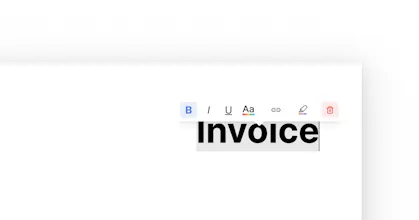
An invoice generator using the browser’s built-in print-as-pdf. Edit the templates and style to your liking. 🪄 A tooltip for markup, hyperlinks, highlighting 🌈 Upload custom logos ✨ The total is automatically calculated 🗑️ Remove and restore elements
Invoicer Studio gallery image
Free
Launch Team
Vy - Cross platform AI agent
AI agent that uses your computer, cross platform, no APIs
Promoted

What do you think? …

Viktor Renkema
Hey everyone. I made this app as I wanted to learn something about some tech I didn't know yet, so I looked into generating PDF's in the browser. Tldr; browsers are already very good at doing this through Print as PDF, better than I could ever do myself. Invoicer thus allows you to edit and style an invoice in an easy and fun way, and relies on the work of smarter devs behind WebKit/Blink/Gecko to export it as PDF. Note: each browser 'prints' a bit differently. In print settings, make sure to: 1. enable background graphics, 2. remove footer and header, 3. margins to none/zero, 4. scale to 1, 5. paper size A4
Anshul Raghav
@viktor_renkema Upvoted! We would be glad to have your support on our launch as well.
Rajesh Kumar
@viktor_renkema Kudos on creating Invoicer! Your approach to learning by delving into the tech behind generating PDFs in the browser is both impressive and practical. It's refreshing to see a project born out of a genuine desire to explore and understand new technologies.
Konstantin Panfilov
Hey, congratulations! Genuinely curious — which tech did you use? Especially considering PDF creation and editing features.
Viktor Renkema
@panphilov Thanks!! It's built on React using NextJS, and animations come from vanilla css combined with Framer Motion. Re: the editor/pdf creation: Tooltip The tooltip uses react context, I set the x and y coordinates on mouse-down and some other stuff in a tooltip provider. I also made some utils to help calculate how much the tooltip should be offset of the mouse click, cause it should be centered above your cursor, not to the top-left. Anchor links This was trickier to implement cause the editor updates the DOM live, so if you insert an anchor link around e.g. a , you actually make the span clickable in the preview. So instead once you add a url, i add your url's and the id of the DOM element to a state, and only once you hit export, I quickly loop over all those DOM elements that you added an anchor link to and actually attach the href. After exporting, I remove them again. That way you get them clickable in the pdf, but not in the live editor. PDF generation I implemented various libraries and wrote up a bunch of 'findings' in a Notion doc, and ultimately ripped it all out and just use the browser's print feature as all major browsers can print as pdf. So now its just a window.print(); call (with a bunch trickery around it, e.g. css to hide everything but the preview, and javascript trickery stuff, like the anchor links described). The research I did into libraries like jsPDF and pdfMake summarized: 1. some libraries worked well, but they convert the DOM to a png, which isnt great as you cant do anchor links/have text selectable in the pdf reader. 2. the better options for turning HTML into non-image PDF is jsPDF. Second would be pdfMake, but all of the layouts have to be done in JSON objects and there is no real way I have found to convert an HTML page layout using this library.”
Konstantin Panfilov
@viktor_renkema Thank you very much for such a detailed description, it is very valuable for me, because I have always been interested in creating such products. I wish you great luck in your research.
Konstantin Panfilov
@viktor_renkema By the way, using the browser feature of printing as PDF is a brilliant idea, which, however, can lead to problems if you want to add additional methods for working with the file, for example, sending by email
Viktor Renkema
@panphilov Yeah fair point, ideally I also wouldn't rely on it, so who knows, if the app takes off I may refactor everything to custom parsing of the DOM to JSON that can be exported as pdf
Jurre Houtkamp
Was just looking for something like this, nice and simple!
Marciano
Have been using this for my invoices for a while now (as a tester). I genuinely like the simplicity (invoices give me a headache). Well done Vik! Hope there are many more lovely templates coming (for every niche freelancer you can imagine)
Anne Lee
I started freelancing last year and it's been frustrating to use existing software to create my invoices. This one is going to change my life! Thank you for making this. ❤️‍🔥
Duy Hùynh
It's great, with this application I can easily create invoices to make advance payments to the company.
Mert Can Eyriyer
Now that is a good UX 🚀 Incredibly easy to use. Congrats Viktor 👏
123
Next
Last