Launching today

incogno AI
Invisible AI Meeting Assistant for Mac and Windows
1 follower
Invisible AI Meeting Assistant for Mac and Windows
1 follower
Invisible AI meeting assistant for Mac and Windows. Real-time answers and live transcription in Zoom, Google Meet and Teams — hidden from screen share.


Payment Required
Launch Team / Built With


AWS Activate CreditsCredits that fuel your startup’s next milestone
Promoted
Hi Product Hunt 👋 I'm Arun, and I built incogno.
The itch: every AI meeting assistant I tried either sent a creepy bot into the call as a "participant", or lived in a browser tab that everyone saw the moment I hit Share Screen. I wanted help during the call — live transcription, a quick answer, my prep notes — without broadcasting to the room that I was using it.
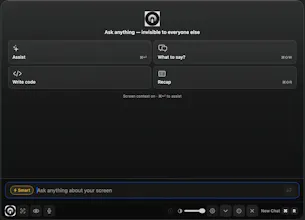
So incogno is a native desktop overlay for Mac and Windows:
• Real-time transcription + AI answers during Zoom, Google Meet, Teams and Webex
• Stays out of screen share and recordings (and we document exactly how that works — and where it can't: incogno.ai/hidden-from-screen-share)
• No bot ever joins your call, your microphone is never captured, raw meeting audio is never stored
• Screen-aware help: it can read what's on your screen and answer about it
Who it's for: interviewers running back-to-back interviews who want live transcripts and follow-up questions, customer-facing teams on demo calls, and anyone presenting who wants their notes private.
To be clear about positioning: this is a privacy tool, not a deception tool. We built it for the person running the meeting or interview — not to help anyone fake their way through one.
There's a free trial (no card), and paid plans if it sticks.
Feedback that would genuinely help:
1. Windows folks — how's the experience vs. Mac? We just shipped Windows parity and want it rock solid.
2. What would make you trust (or distrust) an "invisible" assistant? Where's the line for you?
3. Pricing — fair for what it does?
I'll be here all day answering everything. Ask me the hard questions too.