HotHawk

HotHawk

Cold email master inbox.

33 followers

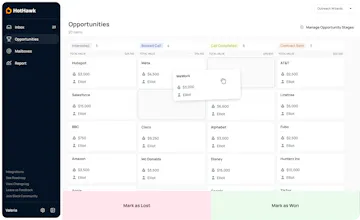
Managing 10, 100 or even 1000 outbound mailboxes is messy and complicated. HotHawk gets you organised by allowing unlimited mailboxes to be connected and pulling everything into one easy to manage Master Inbox.
HotHawk gallery image
Free Options
Launch tags:Email•Sales•Marketing
Launch Team / Built With
AssemblyAI
AssemblyAI
Build voice AI apps with a single API
Promoted

What do you think? …

Elliot Thomas
Hunter
šŸ“Œ
Elliot here, one of the co-founders of HotHawk - thanks for checking out our launch today šŸ™Œ I've been using cold email as a tool to grow my own business in the recruitment space for the last 7 years, but I always struggled with Inbox management. It's 2024 and deliverability is top of mind - so forwarding multiple mailboxes to one is simply not an option anymore unless you want Google or Microsoft to identify you are sending cold emails very easily. The idea for HotHawk came to me when I was configuring around 50 Google Workspace accounts for myself and trying to figure out what to do for the inbox management. I'm aware the main sending platforms have their own version of a master inbox, but none of them really suited my needs so I decided to build it. To validate the product, we designed the product and created an attractive landing page and sold our own lifetime deal. The lifetime deal was a huge success and we ended up turning it off. I'm super grateful to the users that joined our lifetime deal as we have been lucky enough to work with them over the last few months to help shape the product. Really excited today to announce we are now in public beta, and would love for everyone to join us.
Richard  Holt
I’m already using this software and it saves me so much time šŸ™šŸ™
Elliot Thomas
@richard_holt_ Thanks for the kind words man, glad your finding it useful!
Grant
The master inbox is intuitive and easy to use, and greatly increases productivity. Well done, chaps, HotHawk is awesome!
Elliot Thomas
@grantc Thanks Grant!
Gustavo Garcia G
Congratulations on the launch! The product looks pretty cool! Just to make sure I understand it properly... If my company is called domain.com and I have 2 extra domains for cold emailing (e.g. getdomain.com and withdomain.com), I'd typically create new mailboxes for those "virtual" domains and generate forwarding rules to my main domain (domain.com) and continue any possible conversation there. With HotHawk, I could receive those responses in this platform and continue those conversations using the same virtual domains, right? Should I connect the main mailbox too?
Elliot Thomas
@theluctus Thanks for the comment and kind words man! Ahh really interesting what you've mentioned here. The first thing i'd say is if you are using Google or Microsoft mailboxes and forwarding them all to one of your other Google or Microsoft accounts, best to stop now. This is one of the easiest ways to get caught by the big ESPs and their spam filters. However if they are IMAP accounts, you are fine. Regarding your question, you can actually do both! It depends how you like to handle a lead once you get a reply, do you want to keep messaging them on the 'virtual' domains, or do you like to hand over to your 'main' domain? You can connect all of the mailboxes to HotHawk, both virtual and main, and whenever a reply comes in you can choose to continue the conversation on the virtual or handover to the main. Right now by default we would set it to continue on the virtual for you, but we have the functionality coming soon to assist with auto handover. Any other questions lmk! Thanks again,
Daniel Zacharias
An aboslutely amazing tool. Nothing else like it. Saves time and is feature rich, highly recommend.
Elliot Thomas
@danielzachtec Thanks for the kind words man šŸ™