I’ve been using Growlance for the past 3 days, and honestly, it’s impressive.
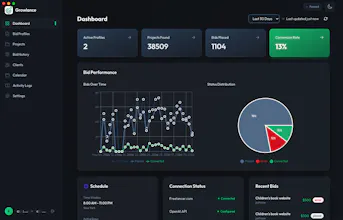
What I like most is that it feels like a real freelancer workflow tool, not just another automation bot. It helps find relevant Freelancer.com projects, scores fit, drafts tailored proposals, and keeps everything organized in one place. The local-first approach is also a big plus for me because my data, API keys, bid history, and client info stay on my own machine.
The setup is straightforward, the interface feels clean, and the ability to control profiles, filters, working hours, rate limits, and proposal generation makes it feel safe and practical rather than spammy.
For freelancers who spend too much time refreshing feeds and writing repetitive proposals, Growlance can save a lot of time while still keeping you in control. Great product, excited to see where it goes next!



How does it actually pick which projects to bid on - is there any filtering by budget or skill match, or do I have to set all that up myself through prompts?
@mertcanbrto94c Great question — it's structured filters, not prompts. Targeting happens in two stages:
1. Hard filters (set once in a "bid profile"): skill categories, search keywords, min/max budget — separately for fixed-price and hourly — project type, client countries, and languages. Anything that fails these never goes near the AI.
2. AI fit scoring: whatever passes gets scored 0–100 against your actual skills and experience (you fill in a short profile — no prompt engineering needed). Only projects above your threshold (default 70) get a proposal drafted, and the analysis also flags red flags like vague scope.
Prompts only come in if you want to customize the proposal writing style — targeting is all config. There are also hourly/daily bid caps and a working-hours schedule so it never sprays your bid credits.
How does the auto-bidder decide when to bid versus hold back, and can I set my own minimum project budget before it starts submitting proposals?
@gizemezmj Yes to the minimum budget — each bid profile has its own budget floors (and ceilings), set separately for fixed-price and hourly projects. Below your floor, it won't even analyze the project.
The bid-vs-hold decision stacks a few gates: hard filters first (budget, skills, countries, languages) → then an AI relevance score of 0–100 against your skills, with a threshold you control (default 70) → plus red-flag detection for things like vague briefs. Anything below threshold gets skipped, not bid on. It also holds back when you hit your hourly/daily bid caps or you're outside your working-hours schedule.
Ran it on a few of my Freelancer bids and was surprised how well the AI proposals matched the project tone without me babysitting it. Love that my own keys stay local, feels way more private than the usual SaaS auto-bidders.
@betlkonurabzyh Thank you, Betül — this made my day! The "without babysitting it" part is exactly what I was going for: the AI reads the actual brief, not a template, so the tone should follow the project.
And yes — your keys and data staying on your machine was a non-negotiable from day one. Glad it's something people actually feel when using it.
If you hit anything that would make it work even better for your bids, I'd genuinely love to hear it — this thread or support@growlance.app both reach me.
How does it actually pick which projects to bid on, and can I set rules or filters so it doesn't go after ones outside my niche?
@ersin168162 Yes, that fencing is exactly how it's built. You define your niche in a "bid profile": skill categories plus keywords, budget floor and ceiling (fixed and hourly separately), project type, client countries, and languages. Anything outside those filters is never even analyzed, let alone bid on.
What passes then gets AI-scored 0 to 100 against your actual skills and experience, with a threshold you control (default 70). So "vaguely related" projects get skipped, not bid on. There's a longer breakdown in my reply to Mertcan above.
One extra that help: you can run multiple profiles (one per niche, each with its own rules).
Does the AI actually adapt to my writing style over time, or does every proposal start to sound the same after a few weeks?
@orhanun9v Honest answer: it doesn't silently learn your style over time. There's no hidden fine-tuning loop, and I'd rather not pretend there is.
Two things keep proposals from going samey, though. First, every draft is grounded in that specific brief (title, description, required skills, budget) plus your own skills and portfolio context, so the content tracks the project instead of drifting toward a template. Second, the voice itself is yours to set: each bid profile has a proposal prompt you can write the way you actually talk, including pasting in a real proposal you're proud of as a style example. Different niches can run different profiles with different voices.
And since you can optionally review and edit every draft before it goes out, if things ever start feeling repetitive, tweaking that prompt is a two-minute fix rather than a retrain.