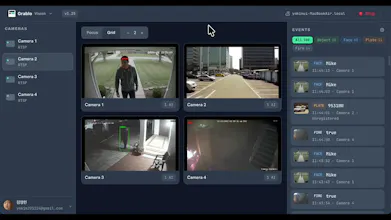
Grablo Vision turns cameras you already own into no-code AI automations. Add person, face, license-plate, or fire detection, then build rules: when something is detected, run actions in sequence like alerts, text-to-speech, logging with snapshots, or Zigbee/relay control. Works with RTSP, ONVIF, and USB cameras. It all runs locally on your own hardware (Raspberry Pi, PC, Docker, or a Home Assistant add-on) and keeps working even if your internet drops. Free for personal, non-commercial use.
Hey Product Hunt,
I'm the developer of Grablo Vision. It turns cameras you already own into no-code AI automations: point detection at a camera, then build rules like "when this is detected, do that."
Why I built it: adding smart alerts to cameras today usually means either a cloud subscription that watches your footage, or wiring up Frigate + Home Assistant + YAML. I wanted something in between. Local-first like the DIY route, but simple enough that you don't have to be a developer to set it up.
What it does:
- Detection: person/object, face (known vs unknown), license plates, and fire
- Cameras: works with your existing RTSP, ONVIF, or USB cameras
- Rule builder: pick a trigger, add conditions, then chain actions in sequence
- Conditions: a schedule, a "sustained for X seconds" filter, or an "ask an LLM" check in plain language
- Actions: push/Telegram/email alerts, logging with snapshots, text-to-speech, audio/video playback, MQTT/HTTP, and Zigbee or relay control
- Scales: multiple cameras, multiple AI analyzers per camera, and multiple rules per analyzer
How it works:
- Configure everything in the web dashboard, then hit Start
- Your whole setup is pushed to your own controller (a Raspberry Pi, a PC, Docker, or a Home Assistant add-on)
- From then on, the AI and your rules run locally on your hardware, and keep working even if your internet drops
- Live viewing is a browser-to-device P2P connection, so your footage isn't proxied through our servers
A quick example:
- Get a photo alert only when an unknown face shows up at the door, while known faces are logged silently
It's free for personal, non-commercial use, and I'm actively building it. I'd genuinely love your feedback, and I'll be around all day to answer questions. What would you point it at first?
Report
How well does the person and face detection hold up in low light or with partial occlusions, and is there any way to fine tune the detection models myself for my specific camera setup?
Report
No reviews yetBe the first to leave a review for Grablo Vision
How well does the person and face detection hold up in low light or with partial occlusions, and is there any way to fine tune the detection models myself for my specific camera setup?