
Glideo
Screen recordings that edit themselves
250 followers
Screen recordings that edit themselves
250 followers
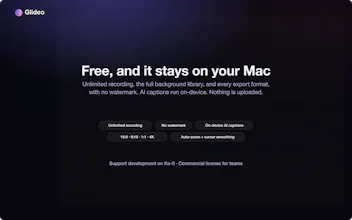
Glideo is a free macOS screen recorder built for product demos and dev tools. It turns raw screen recordings into polished demo videos: the camera zooms toward your clicks automatically, with no keyframing. Same automatic zoom that follows your clicks and cursor. Same polished output. Same "this looks way better than a raw screen recording" result, without a price tag. No trial. No watermark. No catch.


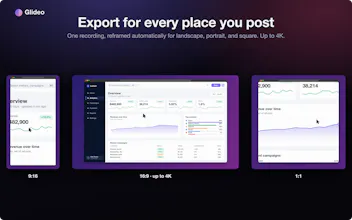


We produce a lot of product screen recordings and editing is 80% of the time cost. What does 'edits itself' catch in practice, dead time between clicks, or does it also handle captions?
@chielephant It captures all of the main events that you perform (any mouse interactions) and dead time can be detected and cut by one of the features in detecting dead time too! Captions is in at an early stage, but it should be available after a few tweak updates!
love it!!! I used to use screen studio to record demo. How is this different! Also whenever I'm making product demo on my own laptop, i always need to hide sensitive information. Would be so nice if there could be a function to blur information but with motion!!
@tina_feng1 Hi Tina! The main difference is that it's free for individuals to use and for all corresponding future updates too! I'm making the tool so engineers and designers have a solid option to use for demo without shelling out money at all! There is a redact feature in the application already!
@edward_ng this is amazing!
@tina_feng1 thanks!!
How do you measure whether AI-generated videos actually outperform traditionally edited content in terms of engagement?
@robert_dimla There is no AI used outside of captioning accuracy! This just simplifies the use-case of application demos specifically and engagement is improved just providing a better curated focus points on software that users have already built! It is an aid on top of traditionally edited content because you still have some core tools that most editing software have too!
This looks really useful for product demos. The automatic zoom based on clicks and cursor the part that attracts to me most—most raw screen recording are hard to follow without manual editing.
Curious how much control users have after recording. Can you fine-tune the zoom moments manually, or the editng fully automatic?
@longway1 Yes, you can absolutely fine tune every part and even add different zooms too!
The product looks really cool! Any plans for Windows?
@sandipanio Currently still iterating heavily on the MacOS version, but once that has a solid v1.0 release, I'll look towards options for Windows as well, but it's not in the current roadmap as of now!
looks cool! However, what exactly makes this different from products like remotion, descript, or even tella?
@lucapiekarski The key difference is that Glideo is native MacOS and fully offline/local as opposed to browser and cloud-based for Tella. Descript is built more for transcript-editing of talking head/podcast content whereas this is more for software demos and product walkthroughs. Remotion is more video-as-code vs a point-and-click GUI that Glideo is!
@edward_ng understood!
I like the local/open .glideo folder angle more than the auto-zoom itself. For devtool walkthroughs, the annoying part is re-cutting when the UI changes right before launch. Does the project store enough click/keystroke metadata to regenerate captions or callouts later, not just zoom segments?