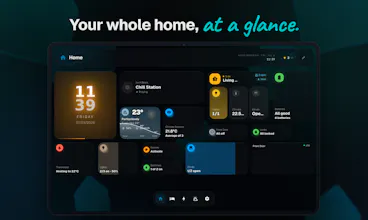
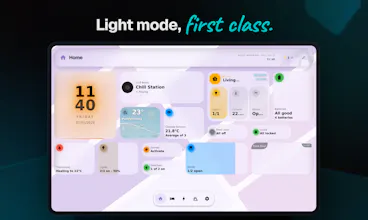
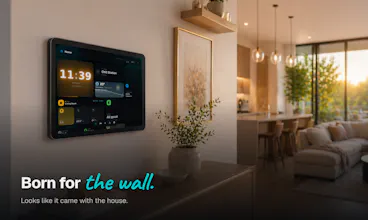
A beautiful Home Assistant dashboard that's finished out of the box. No card-stitching, no theme-hunting. Built for wall tablets and the whole family. Runs on your network.
No reviews yetBe the first to leave a review for GlassHome
Maker
📌
Hey Product Hunt! Solo founder here.
I love Home Assistant. I could never say the same about its dashboard. It runs my whole house, but out of the box it looks like a settings menu, and making it nice ate my weekends. So I built the dashboard I wanted: GlassHome. Drag-and-drop, looks finished the second you open it, and simple enough that my wife actually uses it (biggest win). It sits right next to your existing setup, nothing to migrate.
9 months later it's grown into an ecosystem of nine repos/projects (most of them open source): 95 releases shipped, 35 published widgets, 7.7K widget downloads, and 883 people in the Discord shaping the roadmap.
The piece I'm proudest of is the Widget SDK. Weird out of all I built this is the one I am telling you about, and I know SDK sounds technical, but I swear it's cool: creators build widgets in real code with full freedom over how it looks and behaves, and one command (`widget-cli publish`) puts it in everyone's hands. Shoutout to Coasting24, the first person other than me to build on with it. Better widgets in two weeks than I made in months. That's the whole idea: don't like it? Change it.
Don't write code? A widget browser is built right into the dashboard: browse the catalog, hit install, done. Like an app store for your smart home.
And yes, "anyone can publish code that runs on your dashboard" should raise an eyebrow. It sure as hell raised mine too. A widget can only reach your HA and GlassHome (browser-enforced, not a pinky-promise), never holds your keys, and only touches the devices you approve (a weather widget can't unlock your door). Full write-up: https://glasshome.app/docs/widge...
Most of GlassHome is free. PRO is a one-time purchase, no subscription: $19.99 early-bird (50% off), and I'm holding that price through launch day for PH before it goes back to $39.99.
Curious? Try the demo, no install: https://demo.glasshome.app
Home: https://glasshome.app/ · Install (a few clicks): https://glasshome.app/docs/insta... · FAQ: https://glasshome.app/#faq
I'm here all day. Tell me: what's the one widget your dashboard is missing? <3
Report
How does it handle updates when Home Assistant itself changes, or am I stuck maintaining the layout whenever core gets a big release?
Report
Maker
@dilekfrqa You just update your dashboard app (addon or container) that's it. Everything else is handled automatically. Widgets will then update from inside the dashboard, but it also happens automatically as soon as there you open it. GlassHome is meant to be as friction-less as possible. So don't worry about that. You should not have to interact with any code or plumbing while using it
Report
How does this handle updates to Home Assistant itself, and can you still drop in custom cards when you really need to?
Report
Maker
@ela5lsr You simply update GlassHome. Everything else is handled automatically. HomeAssistant rarely releses breaking updated but if they do GlassHome will already be on the new version. So you just have to keep it up to date. Custom widgets are the heart of it all. You have a whole toolkit to build them and there are the docs to help you https://glasshome.app/docs/widget-sdk. More than half of the available widgets are from other people already
Report
running it on a 10 inch wall tablet and the layout actually looks intentional right away, which is not something i can say for the countless hours i spent tweaking my own dashboard. love that my partner can use it without asking me what a tile means.
Report
Maker
@cumatfcj That was the goal all along! Glad to hear that :D You can also join the Discord and share your setup
Report
Finally gave this a spin on a wall tablet and it just works out of the box. Clean, readable, and the whole family can actually use it without me being the on-call tech support.
Report
Maker
@sareevga This is the exact essence of GlassHome! Glad you and your family are enjoying it
Report
Love the focus on shipping something that works out of the box instead of another dashboard people have to spend hours customizing. Curious what made you decide that "no card-stitching, no theme-hunting" was the pain worth building around rather than adding even more Home Assistant features?
Report
The prebuilt layouts for wall tablets are such a smart move, finally something Home Assistant can hand to non-technical family members without a week of explaining cards. Clean execution.
Report
Maker
@metintuncttkx Thank you! I really appreciate the kind words
How does it handle updates when Home Assistant itself changes, or am I stuck maintaining the layout whenever core gets a big release?
@dilekfrqa You just update your dashboard app (addon or container) that's it. Everything else is handled automatically. Widgets will then update from inside the dashboard, but it also happens automatically as soon as there you open it.
GlassHome is meant to be as friction-less as possible. So don't worry about that. You should not have to interact with any code or plumbing while using it
How does this handle updates to Home Assistant itself, and can you still drop in custom cards when you really need to?
@ela5lsr You simply update GlassHome. Everything else is handled automatically. HomeAssistant rarely releses breaking updated but if they do GlassHome will already be on the new version. So you just have to keep it up to date.
Custom widgets are the heart of it all. You have a whole toolkit to build them and there are the docs to help you https://glasshome.app/docs/widget-sdk. More than half of the available widgets are from other people already
running it on a 10 inch wall tablet and the layout actually looks intentional right away, which is not something i can say for the countless hours i spent tweaking my own dashboard. love that my partner can use it without asking me what a tile means.
@cumatfcj That was the goal all along! Glad to hear that :D You can also join the Discord and share your setup
Finally gave this a spin on a wall tablet and it just works out of the box. Clean, readable, and the whole family can actually use it without me being the on-call tech support.
@sareevga This is the exact essence of GlassHome! Glad you and your family are enjoying it
Love the focus on shipping something that works out of the box instead of another dashboard people have to spend hours customizing. Curious what made you decide that "no card-stitching, no theme-hunting" was the pain worth building around rather than adding even more Home Assistant features?
The prebuilt layouts for wall tablets are such a smart move, finally something Home Assistant can hand to non-technical family members without a week of explaining cards. Clean execution.
@metintuncttkx Thank you! I really appreciate the kind words