
GitGuise
Auto-route git commits to the right GitHub account.
5 followers
Auto-route git commits to the right GitHub account.
5 followers
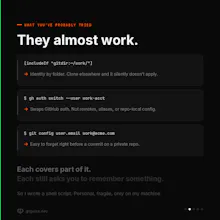
GitGuise automatically routes commits, pushes, and clones to the right GitHub account by reading each repo's remote URL. Unlike gh auth switch (swaps auth only) or includeIf (folder-based), it handles key, remote, and identity in one step. Setup wizard, unlimited profiles, cross-platform. Free and open source.




This solves a very specific but painful problem — accidentally committing under your personal account instead of work (or vice versa) is such an easy mistake to make. Does it detect based on repo/folder path, or does it require manual rule setup per project?
@ark_y_k Great question, Yuki. It detects based on the repo's remote URL, not folder path. So if your remote is git@github.com:acme/internal.git, GitGuise matches "acme" to your work profile and uses that key + email automatically. No manual rules per project. The only "setup" is defining your profiles once during the wizard — after that every repo just works based on where it's pointing.
The remote URL matching is clever, but I'd love to see a fallback for repos without a remote configured yet, like a CLI prompt asking which profile to use when you run git init. Right now I'm guessing it silently picks the default and you don't find out until later.
@derya69sb Great catch, Derya. You're right that git init on a repo without a remote yet doesn't prompt. Right now GitGuise sets the identity when you run "git remote add", but there's a real gap between init and that point. A CLI prompt on git init is the right fix. Adding it to the next release or feel free to contribute 🙌.
the setup wizard actually sounds like the move here, most git identity tools just dump config files on you and wish you luck. handling key, remote, and identity in one step is genuinely thoughtful, downloading this tonight.
@adilaraculb7 Thanks Adil — really appreciate that. The "key + remote + identity in one step" thing was the whole reason I built it. Every existing tool solved one of the three and left the other two for you to remember. Would love to hear how it goes for you.