@suparchie Hi Archie, love the idea of this app! I'm facing the same issue and haven't been able to find a work around. After I attempt to login, I'm prompted the following: https://prnt.sc/sr74a4
@justnyambao Hi Justin! I'm sorry to hear this and also sorry to say i can't replicate this locally. This seems to be a potential solution if you're using a personal Gmail: https://support.google.com/accou... let me know if you're still having issues and I'll get this fixed!
Report
@suparchie Unfortunately, this problem is still occurring whether or not I allow access to less secure apps
@nickisnoble Nick thank you so much for this feedback!! This is really important and I want to get this fixed asap so this doesn't interfere with anyone's workflow.
Off the top of your head, would you be able to think of any "I would never ever use that" keybindings I can swap it out with?
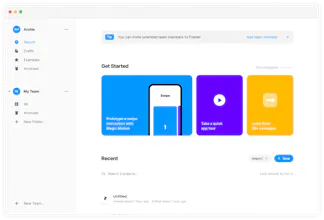
After seeing Framer launch their free web-based tier yesterday I was excited to get on board but disappointed that there wasn't a free companion app as I personally find browser-based design distracting.
So here's a simple desktop version that supports everything on the web version including Google login, drag and drop etc.
For people who regularly will swap between Framac and their text editor, Slack etc.: this app also includes a keybinding (⌘+k) that brings the app to the forefront of what you're doing.



Kiroku
Kiroku
Lifyzer
Kiroku
Lnky
Kiroku
Kiroku
Kiroku
Camorama
Kiroku