
Forq
VS Code agentic issue board
7 followers
VS Code agentic issue board
7 followers
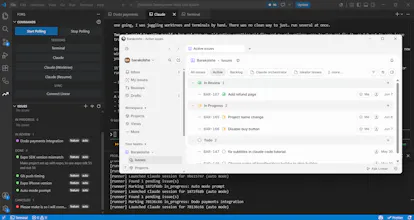
Forq turns VS Code into an issue management panel for Claude Code. Move an issue to To Do and Forq launches a Claude code instance for it, isolated in its own git worktree, running as an editor tab — then moves it to In Review when it's done. Launch, isolate, and resume as many as you want, all working at once. Also integrates with Linear issue manager, which has a mobile app.


Payment Required
Launch Team / Built With


Framer AI AgentsDesign and publish professional sites with AI
Promoted
Hello, I'm Barak, maker of Forq.
This started as a personal itch. I build a lot, usually solo, and I kept hitting the same two walls:
One — I wanted to work on things in parallel. A coding agent is great, but it's one agent, one branch, one thing at a time. The moment I wanted a second one going, I was juggling worktrees and terminals by hand. There was no clean way to just… run several at once.
Two — I wanted to write myself a bug and move on. I'd notice something mid-flow and my only options were to stop and fix it, or tab out to some issue tracker in the browser and break my focus. Both bad.
So I built Forq to fix both. It turns VS Code into an issue-management panel for your coding agents. Jot down a bug or task right in the editor — no new window, no website. Then move it to To Do, and Forq launches an agent for it, isolated in its own git worktree, running as a tab. Spin up as many as you want, all working at once. One solo dev, running like a team.
It's the tool I wished existed while I was building. If you've felt either of those walls, I'd genuinely love your take — what's your current hack for running
things in parallel? And anything you'd want Forq to do next.
— Barak