Slack, but focused. Float AI auto-prioritizes messages, cleans the clutter with a split inbox, summarizes threads, and pings you only when it matters. Ask Slack anything with ⌘K and get cited answers, not search results.
No reviews yetBe the first to leave a review for Float AI: Superhuman for Slack
Maker
📌
Hi Product Hunt 👋 I’m Jari, maker of Float AI.
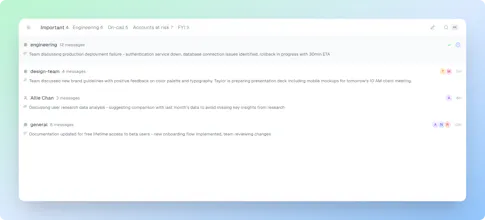
Slack keeps teams moving fast, but it also buries what matters. Important messages drown in noise, threads drag on, and focus suffers. We built Float AI to make Slack calmer:
1. Split inbox that auto-prioritizes
2. Summaries of long threads
3. Only urgent pings reach you
4. ⌘K to ask Slack anything and get cited answers We’re in beta and learning quickly.
What would make this indispensable for your team?
Join the waitlist or contact us here: website.float-chat.com/?src=product-hunt-launch
Report
Jari, thank you for making this product! From the very first minute, the change was monumental — far fewer context switches, and I felt fully in the zone. On top of that, the clean, sleek look immediately stood out. Everything feels lightweight and uncluttered, and the easy-to-use shortcuts make it effortless to stay focused. It’s rare to find something that improves both how I work and how I feel while working.
Report
Maker
Thanks so much, @pelegross 🙏 Hearing that Float AI reduced context switching and made you feel fully in the zone means a lot. We’ve been obsessed with keeping the experience lightweight and uncluttered, so it’s great to see that resonated. Excited to keep refining it and making focus in Slack feel natural.




Hi Product Hunt 👋 I’m Jari, maker of Float AI.
Slack keeps teams moving fast, but it also buries what matters. Important messages drown in noise, threads drag on, and focus suffers. We built Float AI to make Slack calmer:
1. Split inbox that auto-prioritizes
2. Summaries of long threads
3. Only urgent pings reach you
4. ⌘K to ask Slack anything and get cited answers We’re in beta and learning quickly.
What would make this indispensable for your team?
Join the waitlist or contact us here: website.float-chat.com/?src=product-hunt-launch
Jari, thank you for making this product! From the very first minute, the change was monumental — far fewer context switches, and I felt fully in the zone. On top of that, the clean, sleek look immediately stood out. Everything feels lightweight and uncluttered, and the easy-to-use shortcuts make it effortless to stay focused. It’s rare to find something that improves both how I work and how I feel while working.
Thanks so much, @pelegross 🙏 Hearing that Float AI reduced context switching and made you feel fully in the zone means a lot. We’ve been obsessed with keeping the experience lightweight and uncluttered, so it’s great to see that resonated. Excited to keep refining it and making focus in Slack feel natural.