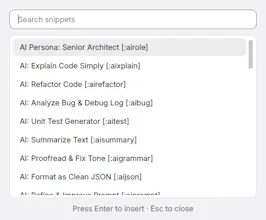
FlitKey turns short triggers into the text you use every day without sending your snippets or typing to a cloud service. Create keyword shortcuts, attach global hotkeys, or open a searchable Quick Insert picker. FlitKey supports dynamic date, time, clipboard, and cursor placeholders, so a snippet can be more than static text. Need a faster start? Load built-in packs for AI prompts, developer workflows, customer support, design, DevOps, and everyday productivity.
Hey Product Hunt! I’m Swaraj, maker of FlitKey.
I built FlitKey because text expansion should not require a subscription, a cloud account, or a pile of YAML just to save a reply, prompt, or command you type every week. I wanted a small desktop app where the important work is visible: create a snippet, give it a trigger, search it later, and keep the data on your own machine.
Key Features
FlitKey gives you three ways to reuse text:
Keyword Triggers: Type a keyword trigger on supported systems.
Global Hotkey: Trigger expansions instantly from anywhere.
Quick Insert: Search with Quick Insert and press Enter.
It also handles the practical details:
Dynamic date/time and clipboard placeholders
Custom cursor placement
Built-in expansion packs
Easy imports from Espanso, AutoHotkey, and common text formats
Platform Details (Linux Support)
X11: Supports typed triggers, hotkeys, and direct insertion.
Native Wayland: Because its security model limits global key listening and simulated input, FlitKey uses the Quick Insert + clipboard paste workflow instead.
Free & Open Source
FlitKey is free, MIT licensed, and runs completely offline with no accounts and no telemetry.
Report
Great tool to have. Earlier, I was using aText for this, not trying this one. Thanks, Swaraj for the free tool.
Report
No reviews yetBe the first to leave a review for FlitKey Text Expander


Great tool to have. Earlier, I was using aText for this, not trying this one. Thanks, Swaraj for the free tool.