Launching today

FillKit
Text expander and one-click form autofill for Chrome
2 followers
Text expander and one-click form autofill for Chrome
2 followers
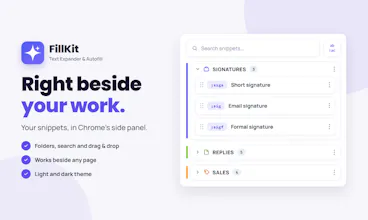
FillKit lives in Chrome’s side panel and does two jobs: it expands snippets from short shortcuts in any text field, and it fills whole forms in one click. Snippets can ask for the parts that change, add dates and auto-numbers, and pull your name and company from your profile. The Free plan works without an account and keeps everything on your device; Pro adds sync, Business adds shared libraries for teams.



Free Options
Launch Team / Built With


ClarifyThe Full-Stack AI CRM that replaces 5 tools
Promoted
Hello Product Hunt! I’m Saverio, and I built FillKit because I kept retyping the same replies and refilling the same forms, and the tools I tried wanted an account before I could save a single snippet. So I made one that works the moment you install it.
What it does:
Snippets expand from a shortcut in any text field, Gmail included. Forgot one? Ctrl+Space searches them.
Snippets can ask for what changes (a name, a day, a dropdown) and fill in dates, auto-numbers and your own details by themselves.
Autofill saves a form once per site and fills it in one click. Password, one-time-code and card fields are always skipped.
It imports from Text Blaze, Magical, TextExpander or a CSV file.
The Free plan is fully local: no account, and your data stays in your browser. Pro (€2.49/month, billed yearly) adds sync, version history and share links; Business adds shared folders and Editor/Viewer roles for teams.
For the Product Hunt community: PRODUCTHUNT50 takes 50% off your first payment until November 10, which on a yearly plan means half price for the whole first year.
I’d love your feedback: what do you retype most often, and what would make FillKit fit your day?