Native macOS app for instant test file generation. Create PDFs, images, videos, CSVs & more locally on your Mac. No internet needed, files never leave your device. Perfect for developers & QA testing uploads, validations, and edge cases.
No reviews yetBe the first to leave a review for FileFaker
Maker
📌
Hey Product Hunt! 👋
Ever uploaded your actual personal files while testing, then had to sheepishly ask your team to delete them from the dev server? (Just me? 😅)
I built FileFaker - a native macOS app that generates test files instantly, right on your Mac.
The problem it solves: As developers and QA engineers, we constantly need sample files - PDFs to test upload limits, CSVs for data processing, large videos for streaming tests. Googling "sample PDF" gets old fast, and you never know what's in those random files from the internet.
What makes FileFaker special: 🖥️ Native macOS app - Buttery smooth, supports Dark Mode, feels right at home on your Mac 🔒 100% private - Files are generated locally using native APIs. Nothing ever touches a server 📁 14+ file types - PDFs, Office docs (DOCX/XLSX/PPTX), images, videos, archives, JSON, CSV 🎯 Precise sizes - Need exactly a 4.7MB PDF? Done. Testing a 2GB upload limit? No problem ✨ Drag & drop anywhere - Generate and drag directly to your browser, Finder, Slack, wherever 📌 Pin on top - Keep it floating above your work for rapid-fire testing
Real use cases from beta testers: - Testing file upload validations without using production data - Load testing with multiple large files - Demoing file features without privacy concerns - Validating MIME type detection and file size limits
It's a one-time purchase (no subscriptions!), works completely offline, and is optimized for both Apple Silicon and Intel Macs.
Would love your feedback! What file types do you find yourself needing most for testing?
@phuctm97 Definitely PDF format. That’s the one we run into problems with most often.
Report
Sounds very promising! Can it generate nested folders with mixed types/sizes and throttle to simulate slow networks?
Report
Hey absolutely love this, curious what data the files contain? Either way, I am getting a malware error, would you be able to have the app verified, really excited to use this!
As the founder of @HelpKit Knowledge Base, a tool that turns Notion into a help desk, we have been integrating AI chats more and more into our product. FileFaker has been a huge time saver for us. We use FileFaker almost daily now to test file ingestions into our AI pipeline. I honestly don't want to think what I'd do without it anymore :)
Report
Maker
@sobedominik Thank you, Dominik! HelpKit is also my favorite product!


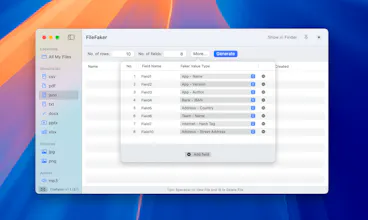

Hey Product Hunt! 👋
Ever uploaded your actual personal files while testing, then had to sheepishly ask your team to delete them from the dev server? (Just me? 😅)
I built FileFaker - a native macOS app that generates test files instantly, right on your Mac.
The problem it solves:
As developers and QA engineers, we constantly need sample files - PDFs to test upload limits, CSVs for data processing, large videos for streaming tests. Googling "sample PDF" gets old fast, and you never know what's in those random files from the internet.
What makes FileFaker special:
🖥️ Native macOS app - Buttery smooth, supports Dark Mode, feels right at home on your Mac
🔒 100% private - Files are generated locally using native APIs. Nothing ever touches a server
📁 14+ file types - PDFs, Office docs (DOCX/XLSX/PPTX), images, videos, archives, JSON, CSV
🎯 Precise sizes - Need exactly a 4.7MB PDF? Done. Testing a 2GB upload limit? No problem
✨ Drag & drop anywhere - Generate and drag directly to your browser, Finder, Slack, wherever
📌 Pin on top - Keep it floating above your work for rapid-fire testing
Real use cases from beta testers:
- Testing file upload validations without using production data
- Load testing with multiple large files
- Demoing file features without privacy concerns
- Validating MIME type detection and file size limits
It's a one-time purchase (no subscriptions!), works completely offline, and is optimized for both Apple Silicon and Intel Macs.
Would love your feedback! What file types do you find yourself needing most for testing?
Fakeradar
@phuctm97 Definitely PDF format. That’s the one we run into problems with most often.
Sounds very promising! Can it generate nested folders with mixed types/sizes and throttle to simulate slow networks?
Hey absolutely love this, curious what data the files contain? Either way, I am getting a malware error, would you be able to have the app verified, really excited to use this!
HelpKit Knowledge Base
As the founder of @HelpKit Knowledge Base, a tool that turns Notion into a help desk, we have been integrating AI chats more and more into our product. FileFaker has been a huge time saver for us. We use FileFaker almost daily now to test file ingestions into our AI pipeline. I honestly don't want to think what I'd do without it anymore :)
@sobedominik Thank you, Dominik! HelpKit is also my favorite product!
snappify
Sounds suuper helpful, need to give it a try! :D
all the best for the launch @phuctm97 🙌
@dominiksumer Thank you, Dominik! Lemme know when you give it a try 😄
fynk
Awesome idea @phuctm97 - good luck on the launch 🔥
Congrats on the launch! Great tool, we can definitely use this when testing different scenarios for https://pdfs.host