
EventForm (Beta)
Turn Google Forms into a powerful event registration tool!
11 followers
Turn Google Forms into a powerful event registration tool!
11 followers
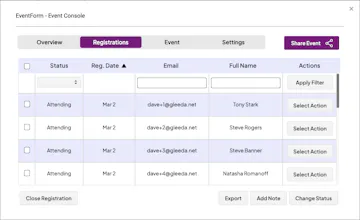
EventForm lets you use the best of Google Forms to collect event registrations, and extends the experience with a customizable website, registration window, approvals, waitlisting, calendaring, reminders, attendance management, post-event emails and more.


Free

Intercom — Startups get 90% off Intercom + 1 year of Fin AI Agent free
Startups get 90% off Intercom + 1 year of Fin AI Agent free
Promoted
Maker
📌We're excited to launch the EventForm in Beta, a new tool to help you promote your event, manage event registrations, and more. But why yet another event registration tool? EventForm is different, and we invite you to read on to learn why.
EventForm is specifically targeted to people who are frequent users of Google's productivity apps like Gmail, Calendar, Drive, and Google Forms. It seamlessly integrates with these apps, which is particularly beneficial for people who already use them in their work place, small business, school, university or club. The data from those apps is already securely stored by Google, so we made EventForm work the same. All of the data collected by EventForm remains only in the event planner's Google Drive account, ensuring data privacy for their event and its participants.
Like Google Forms as much as we do? As an event planner, you can still use the best of Google Forms to collect registration information. But then let EventForm take over where Google Forms stops, with time-saving and impactful features such as a customizable event website, registration window, participant approvals, waitlisting, event calendaring, notifications and reminders, attendance management, post-event emails and more. Read on to learn about all of EventForm’s features and benefits:
🌐 Event Website:
Each and every event managed with EventForm gets its own modern, customizable website hosted on eventform.com with an easily shareable link. Your event’s website will reflect its important information (start/end date and time, summary, description), as well as allow for a custom theme and optional video. Your guests will be impressed with how professional your event looks, whether viewing on a laptop, tablet or phone. Check out an example for our (fake) event, and try registering if you like: https://e.eventform.com?eid=4z%3...
📫 Automated Registration:
When your registration window opens, your event’s website will allow participants to click a “Register” button, taking them directly to your Google Form where they can sign-up. Per your choice, they will either receive an immediate, automated confirmation email, or a notice that their registration will be approved once you’ve reviewed it. Want to limit attendance? No problem. Just configure a maximum number of attendees, and an optional waitlist. When the registration window closes, or if your event reaches full capacity, the website will automatically disable the registration button for you with a helpful message. And no need to send out reminder emails or a post-event email yourself, because EventForm takes care of all that for you automatically.
🔒 Secure:
All of your event and registration data is securely stored only within your Google Drive. We do not store your data outside of your Google environment. We understand that some of your events might be only for your team, collaborators, or a limited set of stakeholders, and so you’d like to keep event information confidential. Not only will your event website never be listed on any marketplaces or directories, but for additional protection you may secure your event website with a password - making it only available to you and your guests. You can also decide to approve each registration manually to ensure that only guests who meet certain requirements are admitted to your event. And we will only share your virtual conference or live streaming information only with guests who are approved to attend your event.
🧩 Integrates Seamlessly with Google Workspace:
EventForm seamlessly leverages Google Forms, Gmail, Google Calendar, Google Drive, Google Sheets, and YouTube to automate event registration. With this approach you can continue using Google tools you already use without needing to use any new tools or services for event registration. Your events will appear within your Google Calendar and your event’s calendar invitations will come from your Google account. All of the event notifications, updates and reminders will come from your Gmail account and any responses will go to your Gmail inbox. You’ll be able to leverage any Google Form for your event, and include as many questions as you’d like. Want to slice and dice your registrations data to better understand your guests? Just export the registrations into Google Sheets. Lastly, if you’d like to entice your potential audience with a video about your event, you can embed a YouTube or a Vimeo video within your event website with an easy copy/paste of the video’s embed tag.
🧾 Affordable:
EventForm is currently free while in Beta. If we do charge in the future, it will be significantly more cost-effective than our competitors.
Report
