
ePointer
Draw & annotate on the screen without interaction conflicts
6 followers
Draw & annotate on the screen without interaction conflicts
6 followers
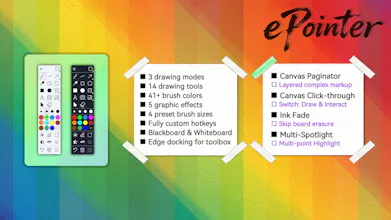
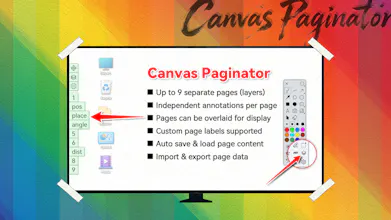
The ePointer is a simple and powerful virtual annotation tool, which supports free drawing, doodling and annotation on any apps. It can be widely used in teaching annotation, remote meeting assistance, online education presentation, illustrated annotation, stock market analysis, etc. With exclusive features like click-through and canvas paginator, you can efficiently enhance expression, collaboration, and interaction without interrupting your workflow.


Free Options
Launch Team / Built With


LightfieldAI-native CRM that builds itself and does work for you
Promoted
Been using this for my remote teaching sessions and the click-through is a lifesaver. One thing that would help a lot: let me save preset pen colors and thicknesses that I can swap between quickly with number keys, instead of going through the color picker every time I switch between highlighters and underlines during a fast-paced lesson.
@aytennwxw This is a great idea, we'll get it sorted, thx Ayten.
the click-through feature is a really thoughtful touch, lets you annotate without losing focus on what you're actually working on underneath.