Thanks for the reply, @vikasr111. I saw your WordPress plugin, but can you tell me more about the widget? Maybe a screenshot of the widget in action. Would love to see it before I sign up. Thank you. :)
@jijojosein Emotify analyses all the post on your website and add customized sentiment set as per the post. The reactions may be different on different posts based on the mood and context of the story. So it appear right after the post and is post specific. Thats why keeping them in sidebar doesn't make sense. As you keep those things in your sidebar which are common and same for your entire website. Emotify is smarter than you think it is :)
Hope that answers your doubt.
This is pretty cool. Kind of like how Buzzfeed lets people react to their articles. Are there any plans to be able to customize the design of the emoticons to match the tone of the site?
@gregstone14 Thanks for your exciting words. Let me know where you'd like to integrate it, we'll help :)
Report
@gregstone14 I am glad you liked it. Let me know if you need any help.
We love receiving feedback.
Report
Well, I created an account and went to try it out. Installed it in WP, authenticated it, tried to view documentation on adding it at the bottom of single blog posts either by shortcode or function, and I get this https://support.goemotify.com/kn...
"Never in all their history have men been able truly to conceive of the world as one: a single sphere, a globe, having the qualities of a globe..."
Interesting :)
How do I embed it via shortcode or function? I'd dig into the code, but don't have time and just wanted to quickly test it out.
Report
Adding the div manually after installing the plugin gives this:
Refused to display 'https://www.goemotify.com/api/ar...' in a frame because it set 'X-Frame-Options' to 'SAMEORIGIN'.
https://www.goemotify.com/api/ar... Failed to load resource: the server responded with a status of 500 ()
Guess some bugs are still being ironed out. Great idea, though. Am eager to get it working.
@lee_peterson Sorry for the inconvenience. As you mentioned your website is on WordPress, please install our WordPress plugin and add the API key there, thats it. It'll take care of everything. Follow the instructions given on the dashboard in "Settings > Setup" section. Let me know if you are facing any further issue.
P.S. - Sorry about that support page. We're working on comprehensive knowledge base :D
Report
Hunter
Emotify is a reaction and re-engagement tool for web publishers, news websites, and bloggers. It lets your readers/visitors seamlessly express their emotions on the story and re-engage them by suggesting more stories based on their current mood. Consider it a smart Facebook Reactions for your website.
Thanks @kwdinc for hunting us here. We are totally excited to bring Emotify to PH community.
To tell you a little bit about Emotify -
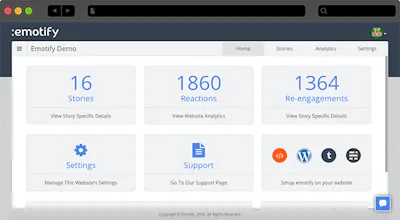
Emotify is a smart reaction and re-engagement tool for web publishers, news websites, and blogs. Website owners and bloggers can easily integrate Emotify on their website to let their audience express on the stories with emotions and re-engage them by recommending more stories based on their current mood. Emotify also provides you with an analytics dashboard to view audience emotion insights and data.
Behind the scene, Emotify uses sentiment analysis, machine learning and an in-house developed, state of the art emotion mapping algorithm, that does the magic.
Please visit our website to know more about Emotify: https://www.goemotify.com/
You can see Emotify in action on our demo blog: http://demo.goemotify.com/
To view the corresponding dashboard visit https://www.goemotify.com/dashboard and use following creds. Username: demo@goemotify.com Password: emotifydemo
Add emotional intelligence to your website with Emotify and lets begin the era of emotion based reaction on the web.
We are looking forward to your valuable feedback.




Fitspur
Emotify
Fitspur
Emotify
Fitspur
Emotify
Cartful
Emotify
Cartful
Emotify
Emotify
Emotify
Remagine AI
Emotify
Emotify