Launching today

Ellis
AI notes for in-person meetings
174 followers
AI notes for in-person meetings
174 followers
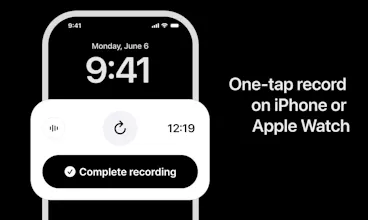
Ellis is an AI notetaker for in-person meetings. Record your meeting, get a clean transcript with each speaker identified, then ask anything — what was decided, what you missed, how it went. No laptop. No extra hardware. Just your iPhone (or Apple Watch).



Ellis
👋 Hey Product Hunt!
I'm Robin, creator of Ellis — a personal AI notetaker for in-person meetings.
What is Ellis?
Ellis is a simple consumer-first AI notetaker (iPhone and Apple Watch) for in-person meetings. It works anywhere being in the same room matters: coffee meetups, on-site sales meetings, therapy, doctor visits, interviews, or even your teacher-parent conference.
When the meeting ends, Ellis matches your voice against your saved voice profile, gives you a full transcript with an easy way to assign speakers, and writes notes in the format you pick.
Why Ellis? 🤔
Unlike other notetakers that are built for your org, Ellis is built for you as an individual. You can record lots of different in-person conversations, ask questions across them, and find common traits and trends spanning both your professional and personal contexts. Yes — I might want to know how my sales meeting went AND how I navigated a difficult conversation with another caregiver. Two different use cases, but one repository, built for me.
Key features 🤩
Getting "who said what" right. Telling speakers apart in a real room is harder than online — every voice hits the same microphone. Ellis solves this with voice enrollment and diarization, plus a fast way to tag yourself and others.
Ask anything about a conversation. Pull up what was said, decisions made, or anything you want to revisit from a meeting — just ask.
Find it by place. Forgot a name or a detail? Ask by location — "what did we agree on during our walk in Fort Greene?"
Private by default. Recordings are automatically deleted once transcription is complete.
Happy to answer questions — and I appreciate the support. 🙏
the noisy-room questions are all covered, mine's about consent instead - you list therapy and doctor visits as use cases, which means the other person in the room is being fully transcribed and analyzable without necessarily agreeing to that. recording is auto-deleted but the transcript sticks around indefinitely. a lot of US states are two-party consent for recording, does Ellis do anything to prompt "hey, tell the other person" or is that entirely left to the user's judgment
Ellis
@galdayan yes! I'm adding an info message before the start of each recording to remind users of consent. I live in Germany, where it's even more pressing :)
When it comes to therapy in particular, I've found that many therapists actually recommend their clients to take notes/record. But that's a very trusted relationship.
Do you have specific thoughts here?
@galdayan @robingreenwood I think the useful move is making consent part of the recording flow, not just a reminder before it. For sensitive contexts like doctor visits, therapy, caregiving, or interviews, I’d trust it more if each recording began with a simple “I have permission to record this conversation” confirmation and then kept retention/deletion settings visible after transcription. The recording disappearing is good, but the transcript is still the durable memory, so that layer needs to feel just as intentional.
Ellis
@galdayan @eduard_turea like a toggle button that when "on" enables recording to start?
The noisy-room question has a nastier cousin: true overlap, two people talking at the same instant. Diarization picks one speaker per frame, so the quieter voice doesn't get mislabeled, its words just vanish, and nothing in the transcript tells you a sentence went missing. That's harder to catch than plain noise because the output still looks clean. When people talk over each other in a fast brainstorm, does Ellis mark the overlap or just pick a winner?
Ellis
@dipankar_sarkar ooh this is a great question. Short answer: Ellis just picks a winner. Diarization returns one speaker + text per utterance.
I'm really curious though, for you is this a problem worth solving using tech or meeting cadence? in other words, does this frequently come up?
The in-person angle is what sets this apart, but recording therapy or doctor visits is also where the privacy question gets sharp. Does the audio and the diarization run on-device, or does the recording get uploaded to a server to transcribe and match against my saved voice profile? And since everyone else in the room never installed the app, is anything about their voice retained, or is it all local to my phone?
Ellis
@hi_i_am_mimo Short answer: server. Nothing about other speakers' voices is retained.
I see you have an interest in local-first apps and privacy. Curious, would this be a non-starter for you? Thanks!
how well does it pick up multiple people talking over each other in a louder room, and what happens if someone joins the meeting late mid recording?
Ellis
@nevzatozuldqgl great questions. Give it a try! I'm testing different scenarios everyday, but I haven't tested super noisy yet.
I'm using a combination of AssmeblyAI for speaker diarization, Pyannote for speaker embeddings (the user records a short snippet of themselves in onboarding to keep their voice as reference), and as well as a UI for the user to explicitly select themselves from speakers in the room.
As far as someone joining later it, that speaker should be added as an additional attendee of the meeting.
What's your use-case?
How well does the speaker identification actually hold up in a noisy room with overlapping talk? Wondering how often I'd need to go back and manually fix who said what.
Ellis
@englyevq you can try it out for free. I purposefully designed a UI that gives you a "best match" on your voice enrollment, and a way for you to pick and label speakers by name if you need to. So the manual "fixing" should be easier
Ellis
@luki_notlowkey I'm using AssemblyAI which models are getting better and better. Do you attend conferences?