
Duplicate Wizard
Side-by-side duplicate finder for Mac
5 followers
Side-by-side duplicate finder for Mac
5 followers
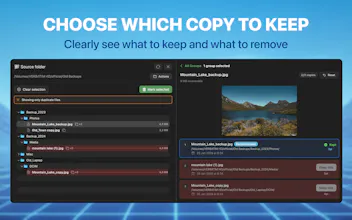
Scan one folder and see duplicate groups with the full folder structure always visible. A configurable scoring engine suggests which copy to keep based on name, date, and path depth. Resolve groups in one click or review them manually with visual previews before moving to Trash. Compare two folders side by side to find shared files. Fully offline — nothing leaves your Mac. Free version available. One-time purchase. No subscription.






Free Options
Launch Team / Built With


LightfieldAI-native CRM that builds itself and does work for you
Promoted
Hi Product Hunt,
I'm the maker of Duplicate Wizard.
I originally just wanted to find duplicate files across a few hard drives. I tried doing it with Finder, but there's no intuitive visual way to track down duplicates across folders and backups.
So I tried dedicated duplicate finders. Most of them showed the same thing: flat lists of filenames. When duplicates are scattered across nested folders and old backups, it's very hard to understand where files actually live. Deleting anything starts to feel like guessing.
So I built a native macOS app where the folder structure stays visible while reviewing duplicates — not just as a path label next to each file, but as an interactive folder tree you can browse and expand. You always see where every copy actually lives before deciding what to keep or remove.
There's also a configurable scoring engine that suggests which copy to keep based on name quality, date, and path depth.
You can scan a single folder to find internal duplicates, or compare two folders side by side to see which files they share.
Everything runs locally on your Mac. No account, no tracking. One-time purchase — no subscription.
Scanning and reviewing duplicates is free, and you can delete a few files to test the full workflow before unlocking unlimited actions.
Have you ever checked how many duplicate files are hiding in your folders? How do you usually deal with them?