
Drifty - Context Aware AI Time Tracker
Bring Visibility to your Focus
90 followers
Bring Visibility to your Focus
90 followers
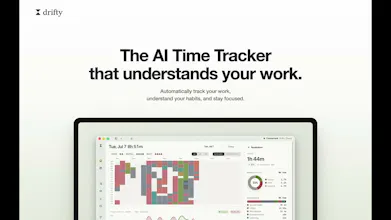
Drifty is an AI time tracker for Mac that shows where your workday actually goes. Automatically track your work with no timers or manual tracking. AI understands the context behind your activity, separates focus from distraction, visualizes your daily workflow, and helps you understand your attention patterns. Need a little help staying focused? Drifty detects sustained distractions and gently nudges you back to work. Runs locally for privacy, with the option to use the cloud when you want.





Hi Product Hunt,
I’m Ari Shin, the maker of Drifty.
A lot of us now spend long hours working alone on a laptop.
But when you work this way, your time gets blurry.
You may feel like you worked all day, then realize a few tabs, videos, or messages kept pulling you out of focus.
I tried existing time trackers to understand this better.
Most of them showed how many hours I spent in each app.
That helped a little, but it missed the real question: was I focused or distracted?
Drifty tracks more than app and website usage. It looks at your role, recent activity context, window titles, and usage patterns, then uses AI to classify whether an activity belongs closer to focus or drift. The same YouTube session can mean different things. For one person, it is research. For another, it is a distraction. Drifty tries to read that context instead of treating every app the same way. Once your activity is classified, Drifty shows when you focus, when you drift, which moments break your flow, and how your day or week actually moves.
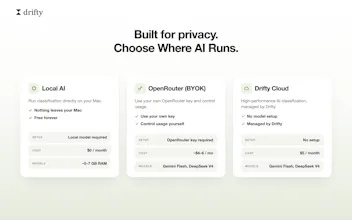
You can also choose how the AI runs:
Run it locally
Bring your own API key
Connect through the Drifty Cloud.
I’d love your feedback!!
the BYOK/local/cloud split is a good answer to the "where does my data go" question in general, but window titles specifically are the part I'd want to understand better - those can leak a lot (email subject lines, doc names, chat previews) even if you never touch the content itself. when you're on the cloud or BYOK path, are raw window titles sent as-is to the classifying LLM, or is there some redaction/hashing step before anything leaves the machine? running fully local sidesteps this obviously, just curious about the other two modes.
@galdayan Short answer: on both cloud and BYOK paths, window titles go to the classifying LLM as-is (just trimmed and truncated to ~160 chars). There's no redaction or hashing step on the outbound request.
What does happen before anything leaves the machine:
- Field minimization: only a curated subset is sent — app name, domain, sanitized URL (credentials/query stripped), title, duration. Raw timelines, session history, and per-window timestamps never leave the device.
- Per-field toggles: you can turn off window titles specifically (also page titles and URLs) and classification still runs on app + domain alone. Honest caveat: these default to on, since titles are the biggest accuracy lever.
- Provider constraints: the cloud path pins zero-data-retention providers with data collection denied. BYOK goes straight to your provider under your key — we're never in the loop.
Content-level redaction before egress (masking emails/numbers in titles) is technically easy but degrades exactly the ambiguous cases titles are needed for. Today the answer for title-sensitive users is: flip the title toggle off, or go fully local. Whether redacted-by-default is the better tradeoff is a fair debate and I'm open to revisiting it.
@max_shin appreciate the straight answer, especially admitting the toggle-off tradeoff rather than pretending redaction is solved. the zero-data-retention pinning on the cloud path is the detail that actually matters most to me here - that's a real commitment, not just a policy line
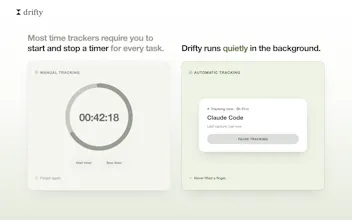
I've been waiting for something like this forever! I always thought existing time trackers didn't work for me because I always forgot to tell the tracker that I have changed projects or to use a different bulling code or whatever. I always wondered why the computer can't monitor that and nudge me at a minimum.
I especially love the, "run it yourself and it's free".
@christopherlawsonux Thanks so much, Christopher!
That’s one of the main frustrations we wanted to solve. Time tracking shouldn’t depend on remembering to start a timer, stop it, or manually update what you’re working on every time your context changes.
With Drifty, we’re trying to move more of that work into the background, so you can understand where your time went without constantly managing the tracker.
Mint Club
This is a really interesting focus app. One question: does it request limited permissions? Is there a clear permission boundary around Screen Time access? I think this could be one of the biggest barriers to installation for new users unless you clearly communicate exactly what permissions the app requests and what it can and can’t access.
@andrew_cho Thanks for bringing this up! Drifty requests Accessibility permission only to identify the active app, read window titles, and access supported browser context. We don’t take screenshots, record your screen, or access the visual contents of your screen. Notification permission is used only to send focus nudges.
Stocknews AI
I’ve been using Rize for a while, but the subscription became a bit too expensive for me. Drifty looks like a really promising alternative. Excited to give it a try!
@vivadios Thanks so much! We actually built Drifty with affordability in mind. If you prefer to run everything locally, it’s completely free. And if you’d like to use our managed cloud service, it’s just $5/month. we wanted to make AI time tracking accessible without the high subscription cost. We’d love to hear what you think after trying it! 😊
@ari_shin - super idea, I'm just not sure I want to know where all my time goes 😃. Seriously though, the insights into how much work I do each day are pretty wild and it would really help me see my focus areas and where I need to be more concious of when I drift/shift to less productive stuff. Also love that I can BYOK and not sign up for yet another subscription. Although the Annual pricing seems very reasonable. Best of luck with the launch.
@codeandsea Haha, that’s exactly why we built it 😄 Our goal is to provide awareness, not judgment. I’m really glad the BYOK option resonated with you as well. Thanks so much for the thoughtful comment and support!