Doing is for AI builders who use voice and screenshots to bring context to Claude Code, Codex, and other AI agents. Tap a hotkey and Doing listens. Optimized over thousands of hours of building with Claude & Codex. Blazing fast, private, local, no account, no subs. Just a quality tool that you own and works well.
👋 I'm Brian, and I created Doing to help me share the context that's in my head and on my screen with Claude Code, Codex, Gemini, and other AI agents. I've used the other tools and they are slow, expensive, and full of privacy nightmares. Doing is the opposite.
Doing is not a general purpose voice transcription tool like the myriad of other voice apps others out there, but purpose built for pairing with your agent. It is simple, fast, and gets out of your way so you can get the ideas out of your head and into the context window.
A few things I'm proud of:
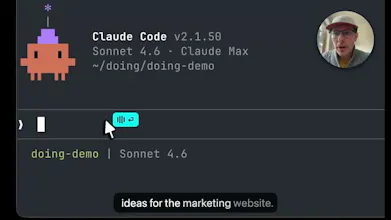
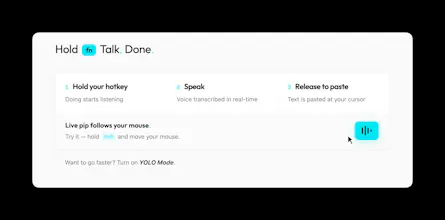
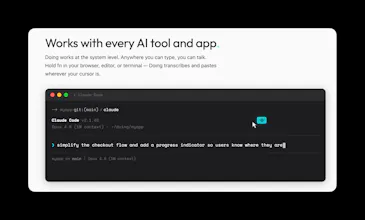
🌱 Simple, effective workflow. Hold a hotkey and Doing listens. The cyan pip follows your mouse, so you'll know where your words will land. (watch the vid above)
🔥 Fastest transcription. NVIDIA's Parakeet is 10-100x faster at transcribing than the alternatives, and it runs entirely on your Mac (Apple Silicon required). There is no latency, no waiting. You really have to try the TDT approach to believe how incredible it truly is.
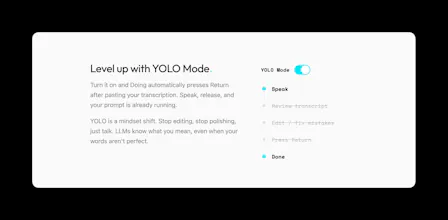
⚡ YOLO mode. Auto-submit your prompt after pasting. Talk, release, and your words and screenshots are already submitted. Avoid the self-editing anti-pattern and let the LLM do its thing.
🙅♂️ Hands free mode. Tap shift to go hands free and just talk. Tap it again to wrap it up. 📸 Screenshots. Drag a rectangle to grab visual context that's automatically added to your transcription.
📝 Markdown transcripts. Transcripts are saved locally as daily .md files. Integrates perfectly with your Obsidian knowledge base.
🔒 Truly local. Your audio never leaves your machine. Not a privacy policy, it's architecture.
📚 Nerd words. Doing is for AI builders and understands AI Engineering, Software Engineering, Product & Biz dev terms and terminology. You can add your own dictionaries, terms, and common corrections.
⚒️ Customize with skills. Post-process your transcriptions with LLM based skills, and tune based on target app. Follows the SKILLS.md standard.
Free trial, no account needed. If you like it, it's $49 and yours forever. I'll be here all day and would love to hear your questions and feedback!
Report
@brianellin Hi. Voice + visual context for AI, does it work well if I’m in a noisy room?
@julia_zakharova2 it works well in noisy environments, yes! NVIDIA's Parakeet model is great in this area, and we also so some filtering for background noise. Give it a try and let me know how it works in your environment.
Report
Mac native, local processing, no subscription, $49 forever — this is exactly how developer tools should be sold. Respect.
I'm a solo founder building a Mac-native video editor with Swift + Rust, and I've been dealing with the same transcription challenge from a different angle: speech-to-text for video editing. The speed difference between local and cloud transcription is night and day for UX.
Curious — you mentioned NVIDIA's Parakeet is 10-100x faster than alternatives. How does it compare to Whisper in terms of word-level timestamp accuracy? That's the one area where I've found local models still struggle.
@cyberseeds that's exciting, I'd love to hear more about your project when ready :)
On your question: Parakeet wins on speed and overall accuracy, but word-level timestamps are its weak spot. The timestamps can drift enough to matter for tight subtitle sync. Have you looked at whisperX https://github.com/m-bain/whisperx? I haven't used it, but have heard it is the go to for word level sync and subtitles.
Report
YOLO mode is a bold UX choice. how did you arrive at auto-submitting without review, and have you found users need to build up trust in it before they stop second-guessing themselves?
@rephelper great question! it's one of those things where once you try YOLO mode, you'll realize that self-review and self-editing is a lot less necessary than you might think and slows you down without much benefit. sure, you can refine your prompt and iterate to make it ideal, but if you're talking with Claude Code or Codex, these models are exceptional at figuring our your meaning whether you are perfectly precise in your wording or not. as long as you are directionally correct, the model will know what to do.
I recommend folks try YOLO with a few low stakes prompts/tasks to get a feel for it and build trust. You'll quickly develop a sense for its power and how much time it saves. YOLO is really a mindset shift. It is very freeing to exit the self-edit doom loop and let Claude take the wheel ;)
Hey! This is super interesting to me as someone who has brought a lot of ai products into my businesses but I have one question. I spend a lot of time refining guardrails for a project, goals, acceptance criteria and describing the workflow such as following TDD. Is there a way to set this up so that some of it is reusable across projects and code bases like we have with AGENTS.md today?
@jordan_carroll2 Great question! One of the reasons that Doing is so fast is that by default there's not an LLM in the loop between you and your transcriptions, and so there's no way for it to go sideways and get off track.
The app does have an optional skills system, where it can run a model after transcription (eg: cleanup, formalize, email-prep, translate, emojify, etc) and it auto-pastes the result into the target app. Doing's skills follow the same pattern as Claude's Agent Skills (SKILL.md Markdown file with YAML frontmatter for metadata). I can see that having a common set of guidelines and guardrails across your skills would be very useful, and rolling that in via AGENTS.md in a cool idea. 💡
Since I'm using Doing to talk to tools like Claude Code, personally I don't run any post-processing as I prefer the speed (local and remote LLM processing is slow!) and in practice have found the output doesn't need any cleanup before sending my voice to Claude. Opus and Sonnet are very good at figuring out what I mean, quirks and all.
@visualpharm Hey Ivan! Congrats on your launch today 🚀
Aqua Voice is great, different philosophy though... Doing runs entirely locally using the fastest model available (Parakeet), so there's not a round trip to the server like with AquaVoice. There is no perceptible delay, and your words appear instantly. One design difference related to this is that Aqua Voice displays your transcription as you talk, which is useful for some, but in my experience is leads to self-editing and distracts me while dictating. I desgined Doing to avoid that UX pattern.
I do think Aqua will wins accuracy, as they have a great model and are doing some cool stuff to see what's on your screen and use that to inform the transcription. That's really useful when you're dictating an email or writing to humans, but for my audience that's talking to LLMs like Claude Code, the target LLM app is great at figuring our your intent even if the characters are not 100%.
The other notable difference is that doing isn't a subscription and we have no servers, so all your voice and data stays on your machine.
Report
bold claim on the YOLO auto-submit. that works fine for prose context but for technical specifics - variable names, file paths, error codes - voice introduces correction overhead that slows you down.
@mykola_kondratiuk i hear you. but if you're working with a frontier model, it can easily infer those specific technical details from your voice prompt by using its tools to grep/search/explore the code. figuring our variable names, file paths, error codes shouldn't be your job. focus on higher level things.
Report
fair point. frontier models are better at inference than they were 18 months ago. my concern is more about edge cases in complex workflows where inference breaks down - not the average use case.
Report
Cool! We actually work a lot with Claude Code, I’ll show it to the team.





Medium
👋 I'm Brian, and I created Doing to help me share the context that's in my head and on my screen with Claude Code, Codex, Gemini, and other AI agents. I've used the other tools and they are slow, expensive, and full of privacy nightmares. Doing is the opposite.
Doing is not a general purpose voice transcription tool like the myriad of other voice apps others out there, but purpose built for pairing with your agent. It is simple, fast, and gets out of your way so you can get the ideas out of your head and into the context window.
A few things I'm proud of:
🌱 Simple, effective workflow. Hold a hotkey and Doing listens. The cyan pip follows your mouse, so you'll know where your words will land. (watch the vid above)
🔥 Fastest transcription. NVIDIA's Parakeet is 10-100x faster at transcribing than the alternatives, and it runs entirely on your Mac (Apple Silicon required). There is no latency, no waiting. You really have to try the TDT approach to believe how incredible it truly is.
⚡ YOLO mode. Auto-submit your prompt after pasting. Talk, release, and your words and screenshots are already submitted. Avoid the self-editing anti-pattern and let the LLM do its thing.
🙅♂️ Hands free mode. Tap shift to go hands free and just talk. Tap it again to wrap it up.
📸 Screenshots. Drag a rectangle to grab visual context that's automatically added to your transcription.
📝 Markdown transcripts. Transcripts are saved locally as daily .md files. Integrates perfectly with your Obsidian knowledge base.
🔒 Truly local. Your audio never leaves your machine. Not a privacy policy, it's architecture.
📚 Nerd words. Doing is for AI builders and understands AI Engineering, Software Engineering, Product & Biz dev terms and terminology. You can add your own dictionaries, terms, and common corrections.
⚒️ Customize with skills. Post-process your transcriptions with LLM based skills, and tune based on target app. Follows the SKILLS.md standard.
Free trial, no account needed. If you like it, it's $49 and yours forever. I'll be here all day and would love to hear your questions and feedback!
@brianellin Hi. Voice + visual context for AI, does it work well if I’m in a noisy room?
Medium
@julia_zakharova2 it works well in noisy environments, yes! NVIDIA's Parakeet model is great in this area, and we also so some filtering for background noise. Give it a try and let me know how it works in your environment.
Mac native, local processing, no subscription, $49 forever — this is exactly how developer tools should be sold. Respect.
I'm a solo founder building a Mac-native video editor with Swift + Rust, and I've been dealing with the same transcription challenge from a different angle: speech-to-text for video editing. The speed difference between local and cloud transcription is night and day for UX.
Curious — you mentioned NVIDIA's Parakeet is 10-100x faster than alternatives. How does it compare to Whisper in terms of word-level timestamp accuracy? That's the one area where I've found local models still struggle.
Medium
@cyberseeds that's exciting, I'd love to hear more about your project when ready :)
On your question: Parakeet wins on speed and overall accuracy, but word-level timestamps are its weak spot. The timestamps can drift enough to matter for tight subtitle sync. Have you looked at whisperX https://github.com/m-bain/whisperx? I haven't used it, but have heard it is the go to for word level sync and subtitles.
YOLO mode is a bold UX choice. how did you arrive at auto-submitting without review, and have you found users need to build up trust in it before they stop second-guessing themselves?
Medium
@rephelper great question! it's one of those things where once you try YOLO mode, you'll realize that self-review and self-editing is a lot less necessary than you might think and slows you down without much benefit. sure, you can refine your prompt and iterate to make it ideal, but if you're talking with Claude Code or Codex, these models are exceptional at figuring our your meaning whether you are perfectly precise in your wording or not. as long as you are directionally correct, the model will know what to do.
I recommend folks try YOLO with a few low stakes prompts/tasks to get a feel for it and build trust. You'll quickly develop a sense for its power and how much time it saves. YOLO is really a mindset shift. It is very freeing to exit the self-edit doom loop and let Claude take the wheel ;)
RaptorCI
Hey! This is super interesting to me as someone who has brought a lot of ai products into my businesses but I have one question. I spend a lot of time refining guardrails for a project, goals, acceptance criteria and describing the workflow such as following TDD. Is there a way to set this up so that some of it is reusable across projects and code bases like we have with AGENTS.md today?
Medium
@jordan_carroll2 Great question! One of the reasons that Doing is so fast is that by default there's not an LLM in the loop between you and your transcriptions, and so there's no way for it to go sideways and get off track.
The app does have an optional skills system, where it can run a model after transcription (eg: cleanup, formalize, email-prep, translate, emojify, etc) and it auto-pastes the result into the target app. Doing's skills follow the same pattern as Claude's Agent Skills (SKILL.md Markdown file with YAML frontmatter for metadata). I can see that having a common set of guidelines and guardrails across your skills would be very useful, and rolling that in via AGENTS.md in a cool idea. 💡
Since I'm using Doing to talk to tools like Claude Code, personally I don't run any post-processing as I prefer the speed (local and remote LLM processing is slow!) and in practice have found the output doesn't need any cleanup before sending my voice to Claude. Opus and Sonnet are very good at figuring out what I mean, quirks and all.
Brila
Congratulations Brian! I'm using Aqua Voice. How do you compare with it in terms of accuracy and latency?
Medium
@visualpharm Hey Ivan! Congrats on your launch today 🚀
Aqua Voice is great, different philosophy though... Doing runs entirely locally using the fastest model available (Parakeet), so there's not a round trip to the server like with AquaVoice. There is no perceptible delay, and your words appear instantly. One design difference related to this is that Aqua Voice displays your transcription as you talk, which is useful for some, but in my experience is leads to self-editing and distracts me while dictating. I desgined Doing to avoid that UX pattern.
I do think Aqua will wins accuracy, as they have a great model and are doing some cool stuff to see what's on your screen and use that to inform the transcription. That's really useful when you're dictating an email or writing to humans, but for my audience that's talking to LLMs like Claude Code, the target LLM app is great at figuring our your intent even if the characters are not 100%.
The other notable difference is that doing isn't a subscription and we have no servers, so all your voice and data stays on your machine.
bold claim on the YOLO auto-submit. that works fine for prose context but for technical specifics - variable names, file paths, error codes - voice introduces correction overhead that slows you down.
Medium
@mykola_kondratiuk i hear you. but if you're working with a frontier model, it can easily infer those specific technical details from your voice prompt by using its tools to grep/search/explore the code. figuring our variable names, file paths, error codes shouldn't be your job. focus on higher level things.
fair point. frontier models are better at inference than they were 18 months ago. my concern is more about edge cases in complex workflows where inference breaks down - not the average use case.
Cool! We actually work a lot with Claude Code, I’ll show it to the team.