
dbFlow.ai
Natural language database agent. We're never in the middle.
25 followers
Natural language database agent. We're never in the middle.
25 followers
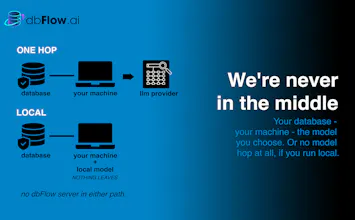
dbFlow is a local database AI agent for Postgres, MySQL, SQLite, and MongoDB. Queries go straight from your machine to the LLM provider you choose. We're never in the middle, credentials stay in your OS keychain, and it's read-only by design. Run it with a local model - nothing about your data or queries leaves at all. Bring you own API key, or use included frontier model keys on paid plans. Ask questions in plain English, get results seconds. Free BYOK tier include, no credit card required.




Love the charts and data visualization option. Curious what type industries this software would be most helpful for? Would love to hear examples of great use cases.
@sean_martin4 Thanks! The charts came out of my own frustration of exporting data to a spreadsheet just to see the shape.
Honestly the strongest fit so far is anyone running a production database without a dedicated analyst. E-commerce and DTC ops has been a big one: refund rates, late shipments, failed subscriptions renewals, cohort questions that would otherwise be a Slack message to an engineer.
The other pocket is regulated work where cloud AI tools are a non-starter. Because everything runs on your machine with your own key or a local model, the data never leaves. That opens it up for healthcare, legal, and finance teams who'd never past a customer table into a chat window. dbFlow also has PHI masking available on the higher tier paid plans.
What are you working with? Happy to say whether it'd actually help or not.
Hey Product Hunt! I'm Jake, the developer behind dbFlow.
dbflow is a desktop AI agent for your database. Ask a question in plain English, get SQL, results, and charts in seconds. Currently supporting Postgres, MySQL, SQLite, and MongoDB.
What sets us apart: there's no server of ours in the loop. Your credentials live in your OS keychain. Queries go straight from your machine to the LLM provider you choose, or to a local model where nothing about your data leaves at all.
It's also read-only by design. dbFlow generates SELECT queries and can't modify anything in your database. No dropped tables, no surprise writes, no "wait, the agent did what?" moment.
Since it's a desktop app, you don't have to take my word for any of this; point Little Snitch at it and watch. You'll see your database (if remote), whichever LLM provider you picked, a license check to dbflow.ai, and an update check. That's it. On a local model, the provider hop disappears too.
I built this because every AI database tool I tried wanted me to upload data to their cloud, or was a web app that couldn't reach my database. It just didn't sit right when working with customer data, financial records, or anything in a regulated environment.
I needed quick answers from databases but didn't want to context-switch into writing SQL, running it, exporting to Excel, and building a chart by hand. That workflow kills momentum when you just want to know "what happened last month?" dbFlow actually started as internal tooling for another project of mine. I kept reaching for it more than for the thing it was supposed to serve, and realized the database agent was the product worth building.
It's grown into a self-correcting agent: it generates SQL, catches its own errors, retries, and builds charts, all from one English sentence. Pick from included frontier models on paid plans, bring your own API key, or run it fully local.
For the launch, there's a PH-exclusive lifetime deal on BYOK Pro - $49 with code PRODUCTHUNT, first 100 users. The free BYOK tier is genuinely usable at 30 queries/day, so you can try it without committing anything.
One thing I'd love input on: which database should I add next? SQL Server, Snowflake, ClickHouse, something else? Tell me what you're actually running, and I'll prioritize accordingly.