Cursor Pro

Mouse highlighter & magnifier for macOS

5 followers

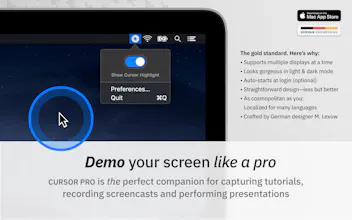
Demo your screen like a pro! “Cursor Pro” is a great tool for highlighting your cursor, visualising clicks & magnifying certain areas of your screen. A perfect companion for capturing tutorials, recording screencasts and performing presentations. Video: https://youtu.be/TyXRfYHLQvc
Cursor Pro gallery image
Launch Team
Unblocked AI Code Review
High-signal comments based on your team's context
Promoted

What do you think? …

Martin Lexow
Dear Product Hunt Community—I love to learn as well as to teach. I produced a ton of video tutorials during the recent years. While I’ve captured my screen, I always missed a simple app that highlights my cursor to draw the viewers attention. That’s why I’ve decided to make one on my own. “Cursor Pro” is straightforward designed, is featured by some subtle animations and pops-up a little magnifier by just a press of a key. I would love to hear what you think about it and how I can improve it even further. 🙂
Santosh Srinivas
@martinlexow I am using Draw tool in Microsoft PowerPoint for freehand writing and record screen using QuickTime player on High Sierra. However, when using Draw tool to write anything on the slide, the cursor is not seen in the recorded video. I have tried other screen recording softwares as well, but no luck. Can you please tell me if Cursor Pro helps me in highlighting cursor in this scenario.
Martin Lexow
@santosh_srinivas1 Dear Santosh, due to the lack of PowerPoint I’m not able to test its draw tool with Cursor Pro, but I have no clue why it shouldn’t work! :)
Martin Lexow
And if you want to display keystrokes, try »Keystroke Pro« https://www.producthunt.com/post... 🙂
Greg Stone
Hey this is great! Already used this several times today when recording videos for clients. Now that I've used the product, one feature request that would be a great shortcut is to simply be able to right click to the menu icon to turn on/off the highlighter. But don't mistake that for a complaint - LOVE the product. Thanks for your contribution.
abd El-RAHMAN Hamza
Nice tool man .. it would be great to enhance the resolution of the zoom feature like the quality of the built-in macOS accessibility zoom feature.
Bryan
Great!!!!!
@Bernardamus
Useful little tool 👏 .... just a wishlist: an option to tweak the size in preferences
Lincoln W Daniel
I too often lose track of my cursor among my multiple screens. This will be of great help for that. Also, will be useful for product demos. I do wish I do make the radius smaller, tho. Thanks!
12
Next
Last