
Skip the setup hassle. Get started with curated prompt examples, intelligent project scaffolding, and built-in best practices to supercharge your Cursor AI pair programming experience.




Maker
📌cursor.new — Intelligent Scaffolding for Modern Development
Hey Product Hunt! We built cursor.new to cut down on the tedious setup for your Cursor AI projects—so you can code more and configure less. No account required—just jump right in!
Why We Built It
We wanted to give developers a quick way to start coding with AI assistance without spending hours on boilerplate setup, writing documentation from scratch, or wrestling with project structure.
Key Features
Smart Prompts: Pre-configured code reviews, docs, and testing prompts to streamline repetitive tasks.
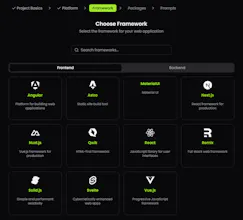
Ready-to-Use Templates: AI-enhanced scaffolds with best practices for web apps, APIs, CLI tools, and more.
How It Works
Pick a Template: Choose from curated project setups.
Start Building: Enjoy frictionless development with everything configured—from dependencies to folder structure.
Customize & Collaborate: Adjust prompts, add your own rules, and work with your team seamlessly.
Give cursor.new a spin and let us know what you think!
Report

We know that different projects requires different configurations and documentations, but how about AI assistants?
CursorNew and it's prompt templates enhances the consistency of the Cursor responses. Users are also able to use this prompts on their preferred AI Assistants or IDEs(Cursor, VSCode, Copilot etc.). That means even if team members work with different IDEs, they can have the same AI instructions and knowhow.
Congrats on your launch @yavuzyalcintas
Report

 Awesome ChatGPT Prompts
I am using Cursor for few months and I was using cursor.directory for basic Cursor rules. This is way more cool stuff for scaffolding scalable projects using Cursor. Congrats on the launch @yavuzyalcintas! 🚀
It would be awesome to have this as a Cursor Extension.
Report

If you are new to Cursor or would like to improve your coding experience, try cursor.new for consistent code development. It has saved me considerable time with PRD prompts and UI design consistency. Additionally, you can use it for Windsurf by simply changing the configuration file name to ".windsurfrules"
Report

I use Cursor IDE for a few months but I have a problem with packages. Cursor.new is a game-changer for anyone diving into AI-assisted coding! As a user, I love how it easy to use the tedious setup process and gets me straight into the action with curated prompt examples and intelligent scaffolding. The built-in best practices are a lifesaver, ensuring my projects are off to the best start possible. It's like having a supercharged assistant that keeps me focused on building and innovating rather than wrestling with configurations. (it is very useful for the developers) Highly recommend it to anyone looking to elevate their pair programming workflow!
Congrats to @yavuzyalcintas and @cursor.new
Report

 Coniun
While working with Cursor on existing or new projects, I was doing almost same steps semi-automatically.
It's a really nice product, well done.
Report

While waiting for the best Cursor starter and helper solutions for our app, it was incredibly nice to come across such news. I can't wait to use it!
Report
123
Next