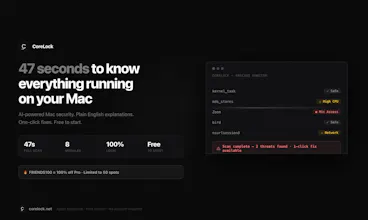
CoreLock scans your Mac in 47 seconds and explains everything in plain English โ no jargon, no scare tactics. See which processes are suspicious, which apps have permissions they shouldn't, and what's eating your battery. Free to start. 100% local.
Hey Product Hunt ๐
I'm Hassanain โ solo indie developer. I built CoreLock because I kept running into the same problem: my Mac is doing things I can't see, and the tools that exist to show me what's happening were either built for IT departments or too technical for anyone without a CS degree.
Why I built this:
I run AI agents 24/7 on a Mac mini โ it's basically a personal server handling automations, scheduled tasks, and background processes constantly. One day I noticed the fan running unusually hot and CPU usage spiking with no obvious cause. I dug into Activity Monitor, ran lsof -i, checked ~/Library/LaunchAgents/ โ and found an orphaned LaunchAgent from an app I'd deleted months ago was attempting outbound connections every 60 seconds and failing repeatedly.
CoreLock found it in 47 seconds. Explained it in plain English. Let me remove it in one click.
That's the use case in a nutshell: you shouldn't need to know what com.apple.corespotlightd does to know if your Mac is safe.
Real use cases CoreLock solves:
๐ Privacy audit โ 67% of Macs we've scanned had 5+ apps with camera access the owner didn't know about. A popular note-taking app had full mic access on my own personal Mac โ granted months ago, completely forgotten. CoreLock surfaces all of it in one screen.
๐ฅ Performance triage โ MacBook running hot for no reason? Fan spinning up constantly? CoreLock identifies which background process is the culprit, explains what it does, and tells you whether it's safe to stop it.
๐ก๏ธ Security for always-on machines โ If you run a home server, a Mac mini, or any machine that's on 24/7 (like I do running AI agents), you have a larger attack surface. CoreLock monitors what's connecting, what has permissions, and what's new since your last scan.
๐งน Permission cleanup โ The average Mac has 31 apps with some form of privacy permission. 42% have at least one app with Full Disk Access that doesn't need it. CoreLock shows you exactly what to revoke and why.
๐จ Threat detection without drama โ XProtect definitions are >72 hours outdated on 34% of machines we've scanned. CoreLock adds behavioral AI analysis on top of signature detection โ it watches how apps actually behave, not just what they're named.
What makes CoreLock different from existing tools:
โข vs CleanMyMac โ CleanMyMac is a cleaner with basic malware scanning. CoreLock is actual security: YARA rules, behavioral analysis, code signing verification, permission auditing.
โข vs Malwarebytes โ Great for known malware, no privacy audit, no permission monitoring. Different tool for a different job.
โข vs Objective-See tools โ Patrick Wardle's tools are incredible and I use them myself. CoreLock is the friendly layer on top: one app, plain English explanations, for people who don't want to learn to read kernel logs.
The free tier is genuinely generous:
3 full AI scans per day. Forever. No account. No credit card. No trial countdown.
I built this because non-technical people deserve to know what's running on their Mac just as much as security engineers do.
Ask me anything โ about macOS internals, how the behavioral AI works, why I made it fully local, anything. I'm here all day ๐
โ corelock.net
Report
No reviews yetBe the first to leave a review for CoreLock