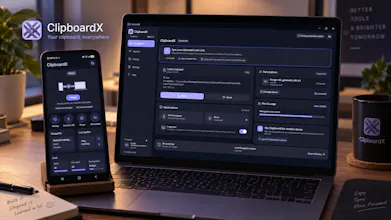
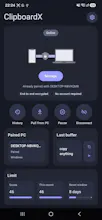
ClipboardX syncs text and images between Android and Windows, so you can copy on one device and use it on the other without sending things to yourself through a messenger. It includes clipboard history, an Android keyboard with direct clipboard access, QR device pairing and privacy controls. No account is required. I originally built it to solve my own frustration with moving logs, links and screenshots between my phone and PC.
Hey Product Hunt 👋
I'm Denys, the solo developer behind ClipboardX.
The idea started with a very small annoyance.
While developing and testing Android apps, I was constantly moving things between my phone and PC: logs, links, error messages, screenshots...
And the workflow was usually:
copy something → open Telegram/WhatsApp → send it to myself → open it on PC → copy or download it again.
Once? Whatever.
Several times a day for months? Surprisingly annoying.
So I wanted something much simpler: copy something on my Android phone and have it available on my Windows PC.
I originally thought ClipboardX would be a small utility. It definitely wasn't. :)
It eventually turned into an Android app with its own keyboard, a Windows application, backend and cloud infrastructure, real-time text and image synchronization, device pairing, privacy controls, billing, and two store releases.
There were several points where I almost dropped the project completely, but this time I wanted to actually finish what I started and get it in front of real users.
And that's mostly why I'm launching it here.
ClipboardX is still a side project that I develop and test mostly on my own. There are definitely device combinations and edge cases I haven't found yet.
So if you use Android + Windows, I'd genuinely love for you to try it.
If something breaks, feels confusing, or you simply think something could be better, tell me. That feedback is probably the most valuable thing I can get right now.
And if ClipboardX actually becomes useful for you, that's even better. :)
Thanks for checking it out ❤️