No reviews yetBe the first to leave a review for Circles
Maker
📌
Hey Hunters! I'm exited to share with you my very first (of many) launch!!
A few months ago, I decided to get into the LinkedIn game for my main business. But I quickly ran into some limitations. As I gained more and more connections, it became impossible to remember who’s who when their names appeared in my feed. I also wanted to keep track of things like whether we’d met, where, and what we discussed.
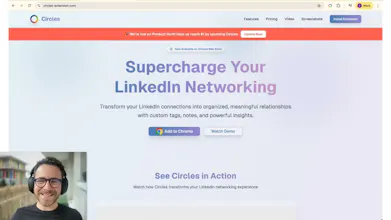
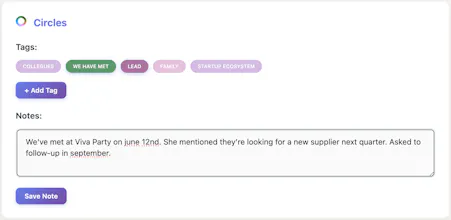
That’s why I created Circles, a Chrome extension that lets you add tags (“circles”) and notes to your connections so you know who they are to you when they show up in your feed. Circles uses local Chrome Storage, so your data is stored securely on your browser.
I originally built it for myself, but after getting promising feedback from friends, I decided to launch it and share it. I’m excited to make Circles my first PH launch 🚀, after reviewing all the great products I’ve seen here.
Since I’ve been using it, it has been really helpful to me, and I hope it will be for you as well!
I’d love to get your feedback.
Report
This is actually really useful. Once your LinkedIn network grows, it becomes almost impossible to keep track of who’s who and how you know them. Circles solves that in a clean and practical way by letting you add your own notes and tags. The fact that it stores data locally is also a big plus. Feels like something I’d use daily.
@quentin_le_gall3 Thank you for the inspiration during the event you hosted at La Cristallerie ;) Really exited by this first launch!
Report
I’m wondering if there’s a way to export the notes in case I switch browsers?
Report
Local storage is a smart move; privacy is important.
Report
Maker
@olive_benett You are absolutely right. Every user owns their own data, stored on the browser. Thank you for highlighting this 🙌
Report
I love that it’s lightweight, not just another heavy LinkedIn “CRM.”
Report
Maker
Thank you@aiden24 ! That's exactly how I intended it : very light, easy-to-plug features. Happy you like it! 🙏
Report
What an interesting idea — tagging connections directly in LinkedIn seems super useful.
Report
Maker
Thanks @ethan_walker10 ! It has been very useful to me since I had the idea! The tags I use the most are : "Lead", "We met", and tags by topic like "RevOps", "Startup ecosystem", "Politics", etc.
Don't hesitate to share yours! Thanks again for the feedback 🚀


Hey Hunters! I'm exited to share with you my very first (of many) launch!!
A few months ago, I decided to get into the LinkedIn game for my main business. But I quickly ran into some limitations. As I gained more and more connections, it became impossible to remember who’s who when their names appeared in my feed. I also wanted to keep track of things like whether we’d met, where, and what we discussed.
That’s why I created Circles, a Chrome extension that lets you add tags (“circles”) and notes to your connections so you know who they are to you when they show up in your feed. Circles uses local Chrome Storage, so your data is stored securely on your browser.
I originally built it for myself, but after getting promising feedback from friends, I decided to launch it and share it. I’m excited to make Circles my first PH launch 🚀, after reviewing all the great products I’ve seen here.
Since I’ve been using it, it has been really helpful to me, and I hope it will be for you as well!
I’d love to get your feedback.
Let's goooo! Congrats Charlie!
@quentin_le_gall3 Thank you for the inspiration during the event you hosted at La Cristallerie ;) Really exited by this first launch!
I’m wondering if there’s a way to export the notes in case I switch browsers?
Local storage is a smart move; privacy is important.
@olive_benett You are absolutely right. Every user owns their own data, stored on the browser. Thank you for highlighting this 🙌
I love that it’s lightweight, not just another heavy LinkedIn “CRM.”
Thank you@aiden24 ! That's exactly how I intended it : very light, easy-to-plug features. Happy you like it! 🙏
What an interesting idea — tagging connections directly in LinkedIn seems super useful.
Thanks @ethan_walker10 ! It has been very useful to me since I had the idea! The tags I use the most are : "Lead", "We met", and tags by topic like "RevOps", "Startup ecosystem", "Politics", etc.
Don't hesitate to share yours! Thanks again for the feedback 🚀