Hi, I’m Tim — the creator of Checklist Genie, and a longtime app builder behind projects like PowerHound, Newsmeister, Total Recall Memory Game, and Aloha Planner.
Each of those apps taught me something different — from game design and content delivery to building great user experiences with React and Unity. Checklist Genie brings all of that experience together into one focused tool I now use every single day.
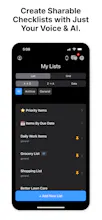
I originally built it to simplify how I manage both work and life. From tracking product features and bugs, to sharing grocery lists with my family — Checklist Genie keeps everything organized and easy to access.
Here’s what I love about using it:
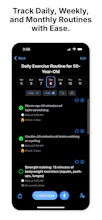
✅ I can plan and track daily routines with a clean, fast UI
🛒 I share lists with my wife for groceries, errands, and travel prep
🧠 I manage product ideas, bug fixes, and priorities in one place
🔁 I schedule repeating tasks and habits without it feeling overwhelming
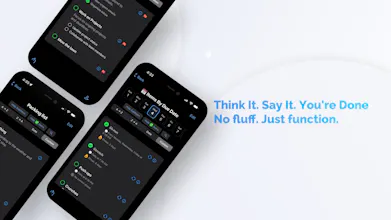
🎤 I can speak or snap a photo to create new checklists instantly
It’s built with SwiftUI, synced through Firebase, and powered by RevenueCat for subscriptions — but more importantly, it’s designed to stay out of your way and help you get stuff done.
If you liked my past apps, I think you’ll find this one the most refined and useful yet. Can’t wait to hear what you think!
– Tim






Osaurus
Dope Notes
@chrismessina
"checklists that create themselves!"
You nailed it. Thank you so much for the support and hunt!
Dope Notes
Origin Story
Checklist Genie grew out of two earlier projects — @Dope Notes and @Aloha Planner App . Both had their strengths, but I wanted something simpler: a tool focused purely on routines and checklists, without the clutter. So I built Checklist Genie for iOS using SwiftUI, Firebase, and ChatGPT — to take advantage of modern UI, smoother performance, and tighter system integration.
The Core Idea
It started with a personal need to better capture tasks, track habits, and share lists. I took the flexibility of Dope Notes and Aloha Planner, then stripped everything down to what mattered most — speed, simplicity, and clarity.
Built-in Intelligence
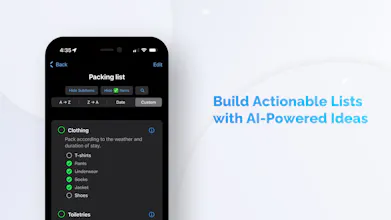
From there, I created something light and intuitive, with voice input, smart routines, and real-time sync at its core. Later, I layered in AI to turn voice and images into actionable checklists — helping users go from idea to organized in seconds.
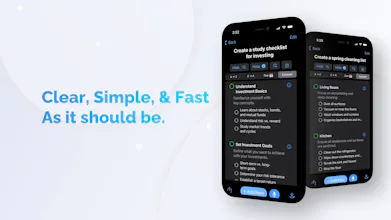
How It Works: “Packing list for a weekend camping trip to Yosemite”
Say this out loud or type it in, and Checklist Genie will instantly generate something like:
Tent & stakes
Sleeping bag & pad
Headlamp with extra batteries
Camp stove & fuel
Reusable utensils & mess kit
Cooler with food & drinks
First aid kit
Hiking boots
Warm layers & rain jacket
Sunscreen & bug spray
National park pass
Trash bags (leave no trace!)
The Result
Checklist Genie is the result — shaped by past lessons, guided by simplicity, and designed for anyone who wants to get things done without overthinking it.
Thank You
With so many new apps launching every day, I really appreciate you taking the time to check out Checklist Genie. If you have any questions or feedback, I’d love to hear it!
minimalist phone: reduce your screentime
So, if I understood correctly, can it be shared and edited by the person I shared it with? Or only seen by that person?
Dope Notes
@busmark_w_nika
Yes, with Checklist Genie, any list you share can be fully edited by the person you shared it with. They can check off items, add new ones, or make changes in real time — and it all stays perfectly synced.
minimalist phone: reduce your screentime
@tim_holmgren1 That's pretty cool (and interactive) :)
Dope Notes
@busmark_w_nika
Thanks, and thank you again for the support.
minimalist phone: reduce your screentime
@tim_holmgren1 You are welcome! :)
Just checked this out love how you turned earlier ideas into something so clean and focused 🔥
The Yosemite example made it click instantly this feels super practical and lightweight.
I’m currently building an AI agent myself, so seeing how you layered in intelligence without overcomplicating things is inspiring!
What was the hardest part when simplifying from Dope Notes + Aloha Planner to this? Would love to hear more about that process. 🙌 @tim_holmgren
Dope Notes
@tim_holmgren @malaika2
Great question! The biggest shift was removing notes and the built-in calendar to focus on aligning habits and routines with regular checklist items. It took some experimentation, but I eventually landed on the current UX. I didn’t want to reinvent the calendar, so I integrated with Apple Calendar and added a link option for Google Calendar. Hope you like the approach!
Most of the time, I work on my to-do list while driving. Is there a way to connect it with Siri so I can just say something like "Hey Siri, add Buy Manago" or something like that? Right now I need to open the app, click on Mic etc.
Dope Notes
@jay_janarthanan1
Thanks! Right now, you can say something like “Siri, open the Checklist app,” and it should launch Checklist Genie. Voice recognition within the app is activated using the large mic button. Hopefully down the road, I’ll be able to combine the two. I’m also exploring CarPlay integration.
Smoopit
The combination of voice, images, and AI for managing tasks is promising. How does Checklist Genie handle offline editing and syncing? @tim_holmgren
Dope Notes
@tim_holmgren @rachitmagon
Thank you for the question,
Checklist Genie does support offline editing and syncing:
Full offline access
According to the official features, you can create, edit, and check off items even without internet connectivity—offline mode works in both the free and premium tiers
.
Automatic sync when you're back online
Once internet access returns, any changes you've made offline are automatically synced across your devices and shared lists
Please let me know how you like the app.
Smoopit
@tim_holmgren @tim_holmgren1 Perfect, thanks for the info!
Congratulations on the launch! Wishing you all the best for the future.
I'm an Android user and just checked out the website—looking forward to the Android version so I can try it out!
Just curious: if a checklist is shared, can users view it without an account? And are they able to interact with it in any way?
Dope Notes
@britestak
Thanks so much — really appreciate it.
Android and WebAPP are definitely on the roadmap, and I’ll keep you posted when they're ready!
As for your question:
Shared Checklists: Right now, lists are private and require any user to have the @Checklist Genie in order to collaborate (interact with it). No sign-up is required for the guest. We support 100% anonymous use — just be aware that data could be lost if they log out or delete the app.
There is also an export Option: You can export any checklist as a CSV file or plain text — perfect for sharing via email, chat, or saving elsewhere.