Chartloop

1-click org chart intelligence that wins deals 🥇

11 followers

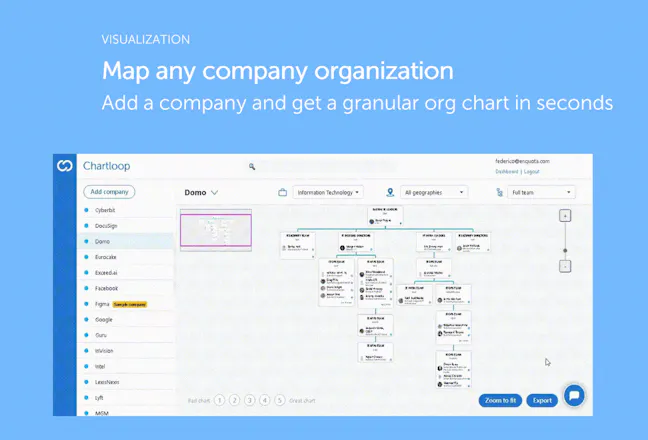
Chartloop lets you visualize the org chart of any company to power your sales, recruiting & business strategy with in-depth organizational intelligence.
Chartloop gallery image
Launch tags:HiringSalesMarketing
Launch Team
Framer
Framer
Launch websites with enterprise needs at startup speeds.
Promoted

What do you think? …

Tuvia Elbaum
Thanks guys for this - great work - definitely saves a lot of work! Curious @seanlewin how do you actually visualize a large company with 100’s of employees like @Apple or @Caterpillar?
Federico Nitidi
Thanks for your great question @tuviae! It's indeed challenging to display org charts of large multinational conglomerates with tens or hundreds of thousands of employees. There are a couple of ways we went about this in the current version: - We allowed the user to zoom into each functional area (e.g. Finance, Engineering, HR, etc). This allows to narrow the focus on a subset of employees and organizational structures - In addition, the user can further apply filters by geography (country/state) and by seniority level, making the visualization even easier. It’s also worth mentioning that the default view for very large companies limits the resolution to the Director level (in order to facilitate the navigation), however more granularity can be ordered on request. Having said this, visualization is really the very core of the product, so if any other idea comes to mind regarding this, please send it outr way! :)
Tuvia Elbaum
@federico_nitidi Sounds good & will do - keep up the great work!
Federico Nitidi
@tuviae Thanks Tuvia!
Avraham Orbach
Is there a way for me to do a reverse search to find a specific person in a company I'm researching? Also, how accurate is the data overall?
Sean Lewin
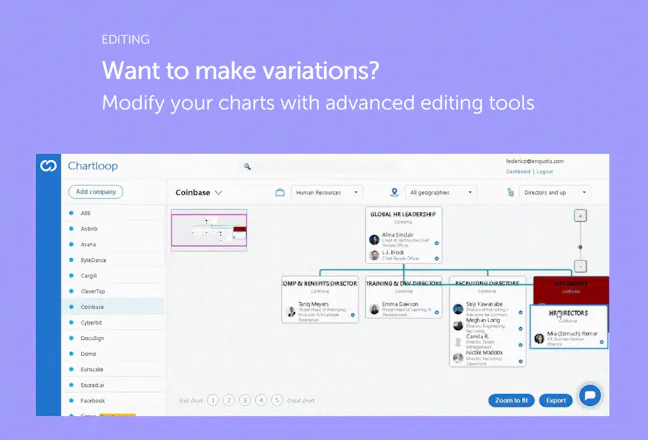
@ay_orbach Great question. At the moment, you can filter by company / function / geography which usually can make it easy to find the individual person. We're adding the function to search individual people. This is especially useful in large orgs if you want to pin-point one person. As for the data accuracy, we use a bunch of unique data sources and then go through a transformation algorithm that cleanses the results. The results tend to be 80-90% accurate. As for the last mile, you need to use your own sources & then can use the drag & drop editing capabilities to finalize your org chart. Would love your feedback as you test it out!
Federico Nitidi
Great points @ay_orbach! Reverse lookup: That's a feature we're currently working on, and it should be live by the end of the month. You will be able to highlight a specific person inside an organization and see a "focused" version of the org chart showing only the immediate people above and below in the org structure. As for data accuracy - our data pipeline is based on public data availbale online and on several other data sources that are otherwise tipically used in the recruiting/ business dev world. Also, all data are gathered in real time to minimize data obsolescence. As far as the precision of the organizational layout/ reporting lines, we trained our algorithm on a large database of org structures as well as infused in it principles & criteria of modern org design. While we cannot guarantee the result to be 100% correct, the goal is to create a close approximation with the same (or higher) quality vs. manual research. It's worth saying that Charloop includes several editing functionalities, so users are able to refine their output, thus crowdsourcing further intelligence to the system.
Shuki Cohen
Looks awesome!!
Federico Nitidi
@shuki_cohen thanks Shuki, appreciate your feedback!
Ohad Oren
Hi guys, great product. Seems to me like a much needed tool. I do have one question. The visualization is great, did you guys think of embedding the contact information of people in each company?
Federico Nitidi
@orenohad Thanks Ohad for your comment and question! You can actually already find some high level contact informations about the people displayed in the chart. To visualize the contacts: - click on the blue LinkedIn icon next to each people name - this will load up the person side panel - from the panel, click on the "Load Contacts" button. Note: we license these data from a third party provider, so the availability of the contact information is subject to their coverage :)
Roy Yosef
amazing product will have my sales team on it right away
Federico Nitidi
@roy_yosef Thanks Roy, really appreciate your feedback!
Kristian Gerardsson
Lowest quality gif I've seen since 1999 ;D Cmon..
Federico Nitidi
@frexuz Hey Kristian, yeah definitely room for improvements with the graphics! Hopefully the product is better than the animations :)
Rivers Evans
I’ve really enjoyed using Chartloop from the outset, and I’ve recommended it to our entire sales org. It’s a very cost-effective way to get accurate org charts of enterprise companies! Keep up the great work Sean and team!
Federico Nitidi
@rivers_evans1 Thanks man, really love your feedback. It's people like you that inspire us to build every day! A lot more coming! :)