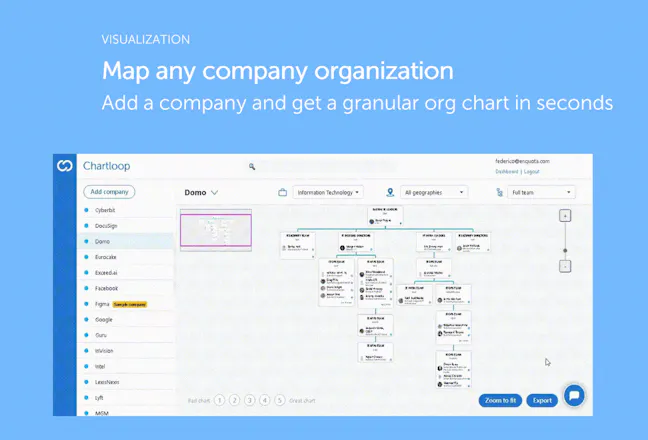
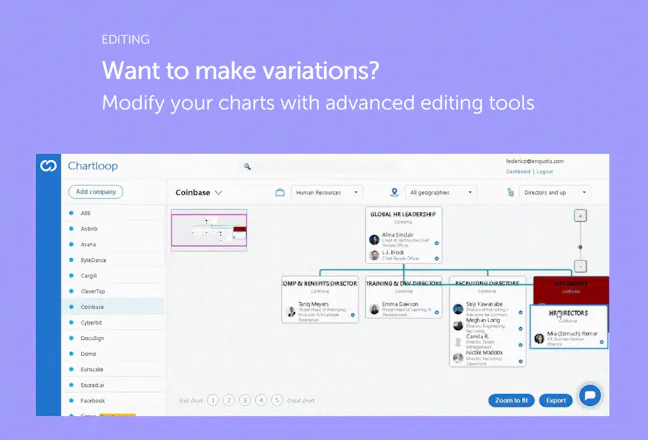
Chartloop lets you visualize the org chart of any company to power your sales, recruiting & business strategy with in-depth organizational intelligence.
Thanks guys for this - great work - definitely saves a lot of work!
Curious @seanlewin how do you actually visualize a large company with 100’s of employees like @Apple or @Caterpillar?
Thanks for your great question @tuviae! It's indeed challenging to display org charts of large multinational conglomerates with tens or hundreds of thousands of employees.
There are a couple of ways we went about this in the current version:
- We allowed the user to zoom into each functional area (e.g. Finance, Engineering, HR, etc). This allows to narrow the focus on a subset of employees and organizational structures
- In addition, the user can further apply filters by geography (country/state) and by seniority level, making the visualization even easier.
It’s also worth mentioning that the default view for very large companies limits the resolution to the Director level (in order to facilitate the navigation), however more granularity can be ordered on request.
Having said this, visualization is really the very core of the product, so if any other idea comes to mind regarding this, please send it outr way! :)
@ay_orbach Great question. At the moment, you can filter by company / function / geography which usually can make it easy to find the individual person. We're adding the function to search individual people. This is especially useful in large orgs if you want to pin-point one person.
As for the data accuracy, we use a bunch of unique data sources and then go through a transformation algorithm that cleanses the results. The results tend to be 80-90% accurate. As for the last mile, you need to use your own sources & then can use the drag & drop editing capabilities to finalize your org chart.
Would love your feedback as you test it out!
Great points @ay_orbach!
Reverse lookup: That's a feature we're currently working on, and it should be live by the end of the month. You will be able to highlight a specific person inside an organization and see a "focused" version of the org chart showing only the immediate people above and below in the org structure.
As for data accuracy - our data pipeline is based on public data availbale online and on several other data sources that are otherwise tipically used in the recruiting/ business dev world. Also, all data are gathered in real time to minimize data obsolescence.
As far as the precision of the organizational layout/ reporting lines, we trained our algorithm on a large database of org structures as well as infused in it principles & criteria of modern org design. While we cannot guarantee the result to be 100% correct, the goal is to create a close approximation with the same (or higher) quality vs. manual research.
It's worth saying that Charloop includes several editing functionalities, so users are able to refine their output, thus crowdsourcing further intelligence to the system.
Super seamless product. Use case is super clear, our sales team fell in love, and parts of this feel like magic. Definitely still a work in progress but very responsive developers ensures that this keeps getting better.
@seanlewin any plans to let users add people to hierarchies themselves, rather than just rearranging employees you pull?
@eytanbuchman Thanks for taking the tool for a spin! The editorial features are still very new. We absolutely plan to add the option to "add people" or even import your own spreadsheet with names to merge with an org chart.
Would you envision adding single people or is it more a bulk import?
Report
I'm a champion of this product as it's helped us turn opaque enterprises into clear organisations in essentially 3 clicks. What's not to love?
Thanks @kylegiddens, that's excatly why Chartloop exists! Great to see you onboard :)
Report
This is awesome! I love simple products that solve a clear problem! I would like to get my sales team on board using this, what is the pricing going to be?
@licnep thanks for your feedback Alessandro! Right now Chartloop is free for the first 10 orgcharts. If you ned more, you can either get 5 free credits for every colleague you invite to Chartloop, or join one of the paid plans starting at $29/mo. per user :)
Hi guys, great product. Seems to me like a much needed tool.
I do have one question.
The visualization is great, did you guys think of embedding the contact information of people in each company?
@orenohad Thanks Ohad for your comment and question! You can actually already find some high level contact informations about the people displayed in the chart.
To visualize the contacts:
- click on the blue LinkedIn icon next to each people name - this will load up the person side panel
- from the panel, click on the "Load Contacts" button.
Note: we license these data from a third party provider, so the availability of the contact information is subject to their coverage :)
Chartloop
Wordcab
ZUtA Labs
Wordcab
ZUtA Labs
Wordcab
Unicorn Pledge
Chartloop
Wordcab
Freightos
Chartloop
Wordcab
Wordcab
ONDiGO
Wordcab