
CaptureKit
Keep your desktop clean by auto-organizing screenshots.
101 followers
Keep your desktop clean by auto-organizing screenshots.
101 followers
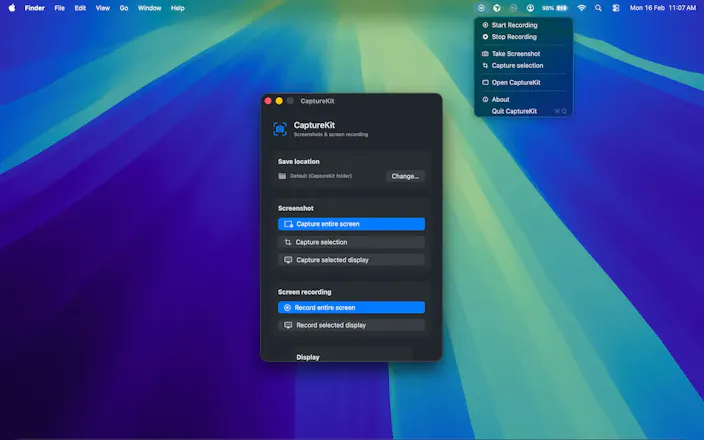
CaptureKit is a native macOS utility that automatically saves every screenshot to the folder you choose instead of cluttering your desktop. Keep your workspace clean, organise screenshots by project, and access them instantly without manually moving files. Perfect for developers, designers, content creators, and anyone who takes screenshots every day.


Great launch! If CaptureKit routes the file straight into a folder, does that markup window still come up? Does it become save-then-reopen-in-Preview? Arrows and boxes are half of why a screenshot is worth sending I guess!
@artstavenka1 Yes. it's save and display the preview.
Finally something that gets the folder routing right out of the box without needing another Hazel rule. Love how clean the menu bar icon stays, no extra chrome cluttering up the workspace.
@rem1219681 Thanks
Would love to see an option to auto rename screenshots with a pattern like project-date-number, makes it way easier to find the right one later instead of scrolling through "Screenshot 2024-05-23 at 3.47.11 PM" files.
@uur29784567603 Thanks, I have noted down your suggestion. I will think about it.
This is such an ongoing frustration with macOS and quite crazy this is not natively a better experience on Macbook. Biggest frustration is naming and labeling. Almost all screenshots I take are in some way 'bookmarks' of something I want to read at a later stage. I often forget about them. Auto-prioritization and context related labeling would be a big win.
@leoautoscaled Yes you are right, I will think about it.
@arjun_gautami That would be so great, will try it out this weekend, excited!
A huge thank you to everyone!
I'm incredibly grateful for all the support, upvotes, thoughtful feedback, and feature suggestions over the past few days. Your comments have been invaluable and are already shaping the future of CaptureKit.
Based on your feedback, I'm excited to share a couple of upcoming features:
Coming Soon
📂 Automatic project-based organization – CaptureKit will intelligently organize your screenshots into folders based on the active screen, app, or project.
⌨️ Global screenshot shortcuts – Use your preferred keyboard shortcut to capture screenshots directly with CaptureKit, making it work seamlessly with your existing workflow.
This is just the beginning. I'm actively improving CaptureKit, and your feedback continues to drive roadmap.
Thank you for being part of the journey! ❤️
Finally, a screenshot tool that just gets out of the way. Love that it saves straight to a project folder instead of piling up on my desktop every time I hit cmd+shift+4.
@berencamba28643 Thanks
I take screenshots daily. This app seems very helpful!
@himani_sah1 Thnaks