
CaptureKit
Keep your desktop clean by auto-organizing screenshots.
101 followers
Keep your desktop clean by auto-organizing screenshots.
101 followers
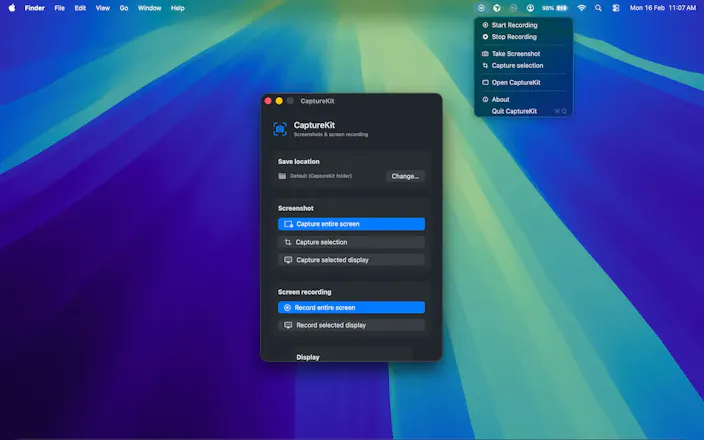
CaptureKit is a native macOS utility that automatically saves every screenshot to the folder you choose instead of cluttering your desktop. Keep your workspace clean, organise screenshots by project, and access them instantly without manually moving files. Perfect for developers, designers, content creators, and anyone who takes screenshots every day.

Free
Launch Team / Built With


LightfieldAI-native CRM that builds itself and does work for you
Promoted
The auto-route-to-a-chosen-folder instead of dumping on the desktop is the exact friction I hit daily. Curious about the routing model: is it one global destination, or can I set per-project rules so shots taken while a given app or Space is focused land in different folders? And does it hook the capture itself or just watch the default screenshot directory via FSEvents and move files after?
@hi_i_am_mimo yes, right now it's global destination, and you may change destination folder anytime.
Right now rule or autometically does not work. I will keep update the app.
@arjun_gautami Global-only is fine for now — the folder picker covers most of my day. Since per-app routing is on the roadmap, the detail that would decide it for me: will routing key off the focused app or Space at capture time, or the window being captured? Those diverge when I grab a background window, and that background case is exactly the one I would want auto-routed.
@hi_i_am_mimo captured at true time.
My desktop is basically a screenshot graveyard right now, so this is an instant "yes" for me. One thing I'm curious about: does CaptureKit intercept the native macOS shortcuts (Cmd+Shift+3/4/5), or do you have to trigger the capture through CaptureKit's own menu/hotkey for the auto-save-to-folder behavior to kick in? Asking because macOS doesn't make it easy to hook the system screenshot flow — if it's the former that's a genuinely hard problem you've solved.
@tarandeep_singh11 Right now, it's only working with own menu. I will add hotkey option.
clean idea, my desktop is basically a screenshot graveyard right now. how does it decide which folder a screenshot goes to, is it just one default folder or can you set rules per app/project?
@galdayan You may choose any folder.
@arjun_gautami got it, so it's a single folder for everything rather than per-app. that's simpler to reason about than I expected, honestly probably the right call for v1 - per-app rules would be a whole settings screen. would you ever add a "watch this folder, sort into subfolders by app name" mode, or is that scope creep you're avoiding on purpose?
@galdayan Yes, with the current flow, it needs to be configured manually. I like your idea, though. I'll look into it and see if I can make it work automatically.
@arjun_gautami fair enough, no need to rush it - manual is fine for now and you can always add the smarter default once you see what actual folder structures people are using it for. appreciate you taking the idea seriously though.
My desktop is a graveyard of "Screenshot 2026-07-..." files, so this one hits. Can I route screenshots by rule — e.g. by active app or window title — or is it one destination folder? Per-project folders that switch based on the frontmost app would be the killer feature for me.
@nitish_garg4 with the current flow, it needs to be configured manually. I'll look into it and see if I can make it work automatically.
would love to see an option to auto rename screenshots based on the active app or window title, like "Slack - design-feedback.png" instead of just "Screenshot 2024-01-15 at 4.32.18 PM". would make sorting through project files way easier honestly
@oktay7khm Thank, I'll look into it and see if I can make it.
Congrats on shipping. One thing worth knowing before you build the hotkey, and I say this as someone who would happily use the version of this that goes further.
macOS already does the base case natively. Cmd+Shift+5, Options, Save to, Other Location, and every screenshot from then on lands in the folder you pick. There is a defaults write for the same setting. So for the exact job on the landing page, saving to a chosen folder instead of the desktop, the system has shipped that since Mojave, and per your reply to Tarandeep, CaptureKit currently only applies when someone uses your menu rather than the shortcut already in their muscle memory. That is a hard sell against something built in and free.
The good news is that the interesting half is the half macOS cannot do, and it is already sitting in this thread. Gal asked about rules per app or project. Uğur asked for pattern based renaming instead of the default timestamp filenames. Neither is possible natively at any price. A screenshot that lands in the right project folder because that project was focused when you took it, named something you can actually search six months later, is a real product. A different default folder is a settings pane.
If it were mine I would park the hotkey and build the routing rule first. The hotkey only gets you to parity with the system. Routing is the part nobody has done.