BotMagic.ai

BotMagic.ai

Powerful AI chatbots designed for your unique business needs

59 followers

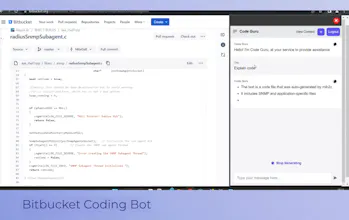
BotMagic is a no-code SaaS platform for building generative bots that are customized to your business needs. Enhance internal productivity with workplace bots, engage website visitors with website chatbots, and accelerate generative AI application development.
BotMagic.ai gallery image
Free
Launch Team
Wispr Flow: Dictation That Works Everywhere
Stop typing. Start speaking. 4x faster.
Promoted

What do you think? …

Zach Danker-Feldman
Hey PH community, welcome to BotMagic! We're currently in early beta, so the platform is free to use while we work to determine community interest as well as the direction we want to take our suite of tools. Feel free to experiment, iterate, and share any questions/feedback you might have in addition to a link to your bot (we'd love to see what you built!) After signing up at https://app.botmagic.ai/bot-temp... and entering your OpenAI API key (LLaMa 2 coming soon), follow these simple steps: Step 1: Create Your Bot 🤖 - Navigate to the "My Bots" page and click on the "New Bot" button located at the top-left of the page Step 2: Configure Your Bot 🛠️ - In the "Bot Info" section, enter the name of your bot, its AI name, and a brief description. In the Security section, decide whether users need to sign in to interact with your bot Step 3: Choose Modalities 🌐 - Next, select the modality(ies) through which users will interact with your bot (Web App, Sidebar, or Floating Widget) Step 4: Provide Context 📚 - In the Context section, provide the necessary data or information that will help train your bot. You can provide static context through text, a document, or a repository Step 5: Save, Test, and Share 🧪 - Finally, save your bot, test it out, and post a link to it below!
ET
congrats on the launch Zach! :)
Zach Danker-Feldman
Thanks ET! We've been excited about this one
Eyal Tavor
Wow. Very impressive!
Tarun Paliwal
Looks Great 👏, congratulations on the launch BotMagic & team
Zach Danker-Feldman
Thanks for the S/O, Tarun! Our team has a lot more in store with BotMagic
Carter Wang
Impressive! Check my site wikigpt3.com and email me your app details and I can help get your app listed on my direc tory and other 100+ AI directories. Feel free to reply if you want to know more.
Zach Danker-Feldman
Hey Carter, sounds interesting. I'm interested to learn more on your project