
BossHogg
Agent-first CLI for PostHog analytics and feature flags
36 followers
Agent-first CLI for PostHog analytics and feature flags
36 followers
BossHogg gives AI coding agents and terminal-native developers a compact, scriptable way to operate PostHog without loading a large MCP tool surface into every session.


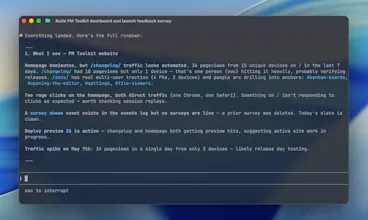


Hey Product Hunt — I’m A-A-Ron, and I built BossHogg, the agent-first CLI for PostHog.
The idea is simple:
MCPs have a purpose. CLIs have a purpose. PostHog MCP is great for rich assistant workflows, web UI parity, and chart-oriented exploration. But when you are working inside Claude Code, Cursor, scripts, or CI, you often want something smaller and more deterministic: a CLI your agent can call on demand.
BossHogg gives AI agents and terminal-native developers a compact PostHog command surface for:
- HogQL queries
- feature flags
- persons, groups, and cohorts
- events and insights
- dashboards and experiments
- production-safe analytics ops
- structured JSON output for scripts and agents
The agent-first part matters. Instead of loading a large MCP tool surface into every session, BossHogg ships with a lightweight skill that teaches agents how to call the CLI when needed.
It is designed to be practical and safe:
- --json everywhere
- stable error codes
- auth redaction
- HTTPS-only release builds
- HogQL auto-LIMIT
- --yes gating for destructive operations
- predictable commands that mirror PostHog concepts
This is not meant to supplant PostHog MCP. It is an alternative interface for a different job: CLI-first agent workflows. Would love feedback from PostHog users, CLI builders, and anyone building AI-agent workflows.
Love the 'agent-first' philosophy here. Having a CLI that understands the intent behind PostHog flags rather than just the syntax is a huge workflow win. How does BossHogg handle complex multi-variant flag logic compared to the standard PostHog web UI?
@rivra_dev Thanks! BossHogg doesn't really understand the flag, it just hands you (and the agent) the same knobs the UI hands you, only as a CLI. For multivariate flags, the config is just a JSON file you keep in your repo. You can diff it, code-review it, let an agent tweak a variant's rollout, all without anyone clicking through a browser. The UI is still nicer for poking around.
Where BossHogg pays off is when you want flags living in version control, or when you want Claude looking after them for you.