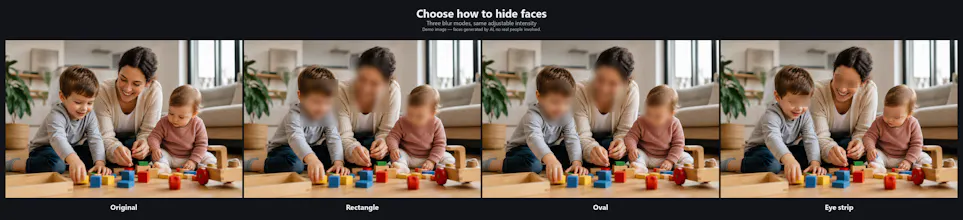
Drop in one video or fifty. Set a couple of options. Blurwise finds every face and blurs it — automatically, across every frame. AI detection handles the faces; tracking keeps them covered when they turn, walk out of frame, or come back. No keyframing, no masks, no timeline work. And your videos never leave your computer. Everything runs locally on your Windows machine — no upload, no cloud, no account. The footage you drop in is the only copy that ever exists.
No reviews yetBe the first to leave a review for Blurwise: Offline Face Blur
Maker
📌
Hi PH 👋
I built Blurwise for a very specific problem I had: I needed to present video footage at a conference — recordings of children, shown to illustrate their behaviour to an audience of professionals. The content mattered. Their faces didn't, and weren't mine to show.
Every option was bad. Blurring by hand in a video editor meant keyframing faces across hundreds of frames. The online tools meant uploading footage of children to somebody else's server, which I wasn't going to do.
So Blurwise does this instead: you drop in one video or fifty, set a couple of options, and it finds every face and blurs it automatically. AI detection finds them, tracking follows them when they turn or walk out of frame and come back. No masks, no timeline work.
Three things I care about:
🔒 Your videos never leave your computer. Everything runs locally on Windows. No upload, no cloud, no account. The file you drop in is the only copy that ever exists.
💳 One-time licence, no subscription. You buy it once. It keeps working.
⚡ It's boring to use, on purpose. Two options and a button. It's not a video editor and doesn't want to be.
I'm a solo developer and this is my first launch, so I'd really like feedback: on the detection accuracy, the pricing, the name, anything. I'll be here all day answering.
Thanks for taking a look