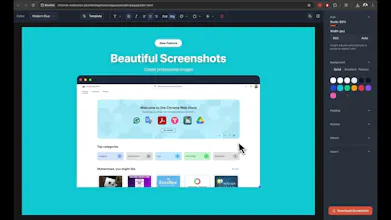
Transform screenshots into beautiful, professional images with custom backgrounds, shadows & typography. It comes with professional ready made templates. Privacy-first Chrome extension & web app. Everything runs locally, no uploads needed.
No reviews yetBe the first to leave a review for Beveled Screenshots
Wispr Flow: Dictation That Works EverywhereStop typing. Start speaking. 4x faster.
Promoted
Maker
š
There are many screenshot solutions that are complex and need subscriptions. I needed to turn my bland screenshots into beautiful shareable graphics so I built this. It comes with many presets, templates, backgrounds etc.
You can make your screenshots pop and stand out on social media.
Here are some key features.
š± Multiple Capture Modes
Visible Area: Quick capture of what you see
Full Page: Automatic stitching for complete page screenshots
Device Viewports: Mobile, tablet, and desktop presets for responsive previews
šØ Powerful Editor
Beautiful Backgrounds: Gradients, patterns, and custom colors
Professional Shadows: Subtle to dramatic depth effects
Window Chrome: Add realistic browser frames and device bezels
Rich Typography: Text overlays with full formatting control
Shape Tools: Arrows, highlights, and geometric elements
Smart Templates: 20+ pre-designed layouts for instant inspiration
š Privacy-First Design
100% Local Processing: Everything happens in your browser
No Uploads: Your images never leave your device
Open Source: Fully transparent and community-driven
ā” Lightning Fast
Instant Preview: See changes in real-time
One-Click Export: PNG or JPEG with perfect quality
Chrome Extension: Capture and edit without leaving your workflow
This is completely opensource and MIT licensed, any one can fork it and turn it into whatever they want.