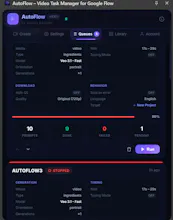
AutoFlow Chrome extension automates Google Flow video generation. Batch process hundreds of prompts, smart queue management, auto-retry failures, bulk download in 4K. Generate AI videos 10x faster ā text-to-video, image-to-video, and ingredients mode. Free to install.
As the creator, you MUST leave the first comment immediately after launching. It tells the story of why you built it. Copy/paste this and tweak it if needed:
š Hey Product Hunt! I'm the maker of AutoFlow.
If you've ever tried to make a short film or large project using AI video tools like Google Flow, you know the pain: pasting a prompt, clicking generate, waiting 5 minutes, downloading the video, and repeating that process 100 times. It completely kills your creative flow.
I got so frustrated acting like a human robot that I built AutoFlow.
AutoFlow is a Chrome extension that puts Google Flow on complete autopilot. Here is what it does: ā” Batch Processing: Paste your entire script (50+ prompts at once), and it separates them into tasks. š§ Smart Queues: It types the prompt, clicks generate, waits for it to finish, and moves to the next one automatically. š Auto-Retry: If a generation fails (which happens a lot in AI), it catches the error and retries for you. š„ Bulk Download: When it's done, you can batch download all your videos in 4K with one click.
It is completely free to install and use for text-to-video, with a Pro tier for heavy users who want unlimited queues and image-to-video mapping.
I'd love to hear your feedback, feature requests, or answer any questions you have about the automation! Thank you for checking it out! ā¤ļø
Report
No reviews yetBe the first to leave a review for AutoFlow