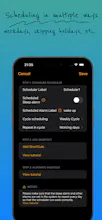
A iPhone system alarm clock scheduler, can help the system alarm clock skip holidays, and can customize the cycle scheduling period of the system alarm clock (the default is 7 days), allowing you to freely schedule the operation of the system alarm clock
👋Hello everyone! I'm Jim, the Developer of autoAlarm 😊
I have been using iPhone for a long time and used its system alarm clock to wake me up, but because the system alarm clock cannot skip holidays and customize the schedule, it occasionally makes me miss work time. Third-party alarm clocks are either implemented through system notifications or through background running, neither of which makes me feel very satisfied.🫤🫤🫤
Later, I learned about shortcuts and automation, and I found that these iPhone features can make the system alarm clock perfectly skip holidays, so I sent this app [AutoAlarm]🥳🥳🥳
This is how AutoAlarm works:
💻 Configure scheduling cycles, dates, alarm names, and even sleep alarms directly from the app.
💻 Trigger system alarm through system shortcuts and automation.
This is the app's key features:
✅Skip holidays and custom vacations with ease.
✅Customize scheduling cycles to your preference, whether it's alternating weeks or unique schedules like working three days and resting two.
Welcome to download and experience this app. We are look forward to get your suggestions and feedback. Thank you all. 🙏🙏🙏
Report
Reviews
No reviews yetBe the first to leave a review for autoAlarm: Schedule iPhone System Alarms
IsletPassword