Auto Mouse

Auto Mouse

Designed to stop the pain from mouse-related RSI.

39 followers

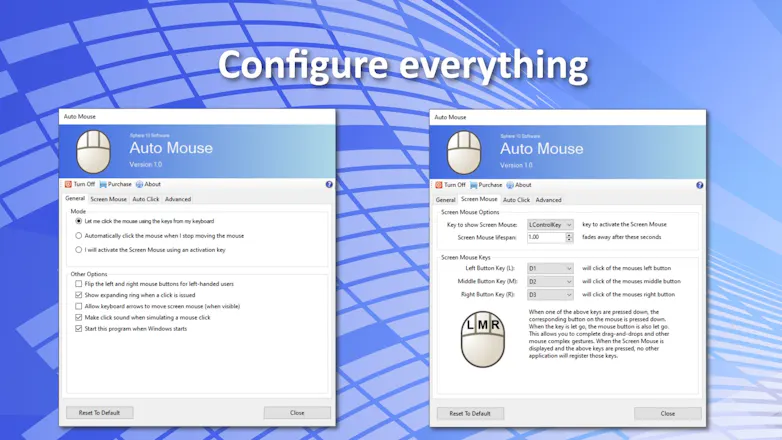
Auto Mouse is a background utility designed to alleviate the strain associated with overuse of a computer mouse. It totally changes the way you operate your mouse by shifting the ergonomic workload from your mousing hand to your keyboard hand.
Free Options
Launch Team
Famulor AI
Famulor AI
One agent, all channels: phone, web & WhatsApp AI
Promoted

What do you think? …

Herman Schoenfeld
Hi Product Hunt Community, This product was built to help people who suffer from mouse-related Repetitive Strain Injury. There are some professions out there (banking, trading, insurance, etc) which require computer users to literally click a mouse all day long. As a result, some people develop debilitating conditions like "trigger finger" that give them unbearable pain when clicking a mouse. In particular, I originally built this tool for a user who worked in insurance and whose job consisted of clicking on forms all day long. He reached a point in his life where the pain was so excruiciating that he was unable to operate a computer mouse and perform his duties in his role. His livelihood was on the line and his workers insurance wasn't prepared to cover this issue. In his words, "we saved his life". These words inspired me to develop and release this product for the public market. Here it is.
Angelika Grigoryan
Congratulations on the launch🎉Would love to see a video showcasing how it works. Good luck )
Shubham Pratap Singh
Congratulations on the launch🎉🎉
Aldo Radesic
Congratulations on the launch. I have downloaded and tested the program. The 'Automatically click when stop moving' feature solves my problems. Unfortunately, I have been using a business application for some time now that was probably programmed by sadistic programmers because instead of one or two mouse clicks for common operations, I have to click up to 10 times.
Herman Schoenfeld
@aldo_radesic Thank you. Yes, poor UI/UX design in many corporate/line of business apps suffer the over clicking problem. Automatically clicking the mouse is great for those apps although you must train yourself to rest the cursor on background and never on a button/control to avoid triggering it. How intuitive was the UI for you? Any sore points?
Aldo Radesic
@herman_schoenfeld The program works great. The only minor issue I had was that it closed some windows too quickly if I accidentally moved the cursor to the top right close button.
Naomi Chao
This is certainly unique. I love my vertical mouse and I'm always trying to stay on top of keeping my wrists healthy for as long as I can as someone at a computer all day 🙌