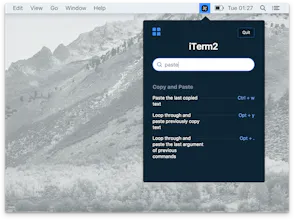
Pretzel is Mac desktop app that shows and search keyboard shortcuts based on your current app.
4 followers
Pretzel is Mac desktop app that shows and search keyboard shortcuts based on your current app.
4 followers
π In-App quick search: Find your specific shortcut with quick search among hundreds.
β‘ Detects the currently focused app.
π Little distraction from your current task. Clicking on the menubar icon or hit CmdorCtrl + (backtick) on keyboard will automatically opens the shortcut panel.
No reviews yetBe the first to leave a review for Pretzel
Fixed the issue that prevented macOS users from switching betweens different windows of the same app (like me having a window for each Chrome Profile). The new shortcut and download link are on my fork:
Just a temporary fix cause I was bored and I liked reading Amie's organized and readable source code!
https://github.com/cucumbur/pretzel
Amie, if this is bothersome I'll respect whatever you want me to do - I certainly have no intent of trying to take over your product, I just started using it immediately and had to fix this lil thing before i could go on with my day :)
@cucumbur Hi Rick! In case you are still interested, I just did an update on Pretzel (v0.6.0), which allows users to update their own shortcuts.
Report
I have a very bad short term memory *cough* (nothing to do with living in Washington state) so I find tools like this incredibly handy. And it is just that - incredibly handy.
Pros:
IMO the best way I've seen yet to present keyboard shortcuts besides the few apps that have their own cheatsheet mechanism.
Cons:
Only a couple handfuls of products are supported right now
Really cool product! It's similar to a product I built called Macro, a Chrome extension to discover shortcuts on the web (instead of native apps) https://www.producthunt.com/post...
Shortcut discovery is always a pain!
Oh hey, something that shares a name with me and is actually useful. Never thought that would happen, but here we are! Good job on making the app, super love it for all the keyboard shortcuts I just can't remember. (i.e. anything that is not my terminal, browser, editor or Sketch π)
Report
Canβt wait to give this a try. One thing I would love to see is anytime I do something the manual way pretzel tells me what keyboard shortcut I could have used. That way I can learn the keyboard shortcuts as well. Thanks!
Just did a somewhat big update! In addition to more shortcuts (thanks to people's PR), now you can toggle dark/light theme, as well as set your own global shortcut to invoke Pretzel! Please let me know your thoughts :)
Report
@amiechen01 Introduce Dark/ Light theme toggle, please? Not a fan of dark theme :)
@binoyxj Just did an update which allows users to toggle Dark/Light theme. The app should notify you to install a new update, if not, feel free to download the new version here https://www.amie-chen.com/pretzel/ again. Thanks!
Report
@amiechen01 Awesome! Just did a manual update and gotta say it's neat. But a brighter Blue (for shortcut text) wouldn't hurt :)
Spider Pro
I have a very bad short term memory *cough* (nothing to do with living in Washington state) so I find tools like this incredibly handy. And it is just that - incredibly handy.
Pros:IMO the best way I've seen yet to present keyboard shortcuts besides the few apps that have their own cheatsheet mechanism.
Cons:Only a couple handfuls of products are supported right now
Figma
Notebag
Spider Pro
Spider Pro
Spider Pro