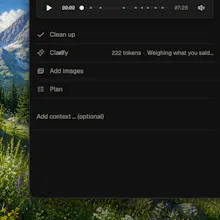
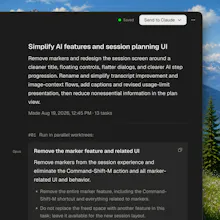
I've been using it for a side project where I'm bouncing between the app itself and telling my coding agent what's wrong with it. Normally that means stopping, taking a screenshot, and typing a paragraph describing something I could point at in two seconds. With Aloud I just hit record, click around and talk through what's broken, and it turns that into a clean written task with the actual screenshot attached. The part that impressed me most is that it catches things you can't screenshot after the fact, like a hover state or a loading spinner that only shows up for a second - since it's recording continuously it grabs the exact frame you were talking about.
The clarify questions it asks at the end are useful but on a longer session I got four or five of them back to back, which broke the "faster than typing" pitch a bit since I was back to typing short answers anyway. Batching similar ambiguities into one question, or letting me answer a few by just re-pointing at the screen instead of typing, would keep the whole thing voice-first end to end.
I already use Wispr Flow for dictating messages and docs, so I looked at it first, but it's solving a different problem. Wispr just turns speech into text wherever you're typing. Aloud is specifically built around narrating over your own app while it records the screen, then turning that into a structured task with the right screenshot attached, which is a much better fit for the "here's what's broken" workflow than plain dictation.
@wojciech_dobry Looking forward to it - the ephemeral-state capture alone already makes it worth keeping in the loop for me. Good luck with the launch!
@wojciech_dobry Being able to just point and talk feels way more natural than typing it all out.
awesome!
@wojciech_dobry Any plans to open source this so it can be ported over to intel mac?
This is intriguing but I'm confused. I do this process with Whisperflow and tell Claude Code all the things I want to have changed on screens and use Fable to orchestrate Opus agents to make the changes. Since it can see the screen shots on the local dev server for the screen I'm talking about it knows already and I just tell it which button or components to change (not by component library name, just natural language) and it does the updates? Perhaps I'm missing something.
@automateiq You're not missing much*. If you're the developer, the app is a local web app, and your agent can drive it – that loop genuinely works. Aloud is for the parts where it doesn't.
Your agent screenshots the dev server, so it sees the screen it can reach. It can't reach the state you were in: a hover, a loading shimmer on the third row, an error that appeared once, step four of a flow behind auth, an animation mid-frame. Aloud records continuously, so the picture attached to a sentence is the frame from the moment you said it. It's also not browser-bound — same thing works on a native app, on Figma, on someone else's product.
The other difference is who resolves "this". In your loop the agent guesses from a screenshot and you find out whether it guessed right after the diff. Aloud asks you first — one question, over the line it's about, with a recommended answer and one alternative, usually a tap — then folds your answer into the transcript, so "move this button" reaches the agent as "Move the Export button to the left of Settings." A wrong guess costs an agent run; a question costs a tap.
What comes out is a plan – tasks sized for one worktree, in waves that run in parallel, each with its own brief and screenshots. You've built that part yourself. Most people talking to an agent haven't.
Aloud takes the commitment out of speaking: with dictation, the moment you stop talking it's already running – here nothing moves until you've read back what you said and changed your mind as many times as you like.
Aloud is designed for long running sessions. You could easily talk to it for an hour.
* – yet, because Aloud in a week will offer MUCH more.
@tmaleh_ Whisper on-device is what ships today, but it's behind a small adapter, so the engine is swappable — and we're genuinely open to changing it. I'll give Raycast dictation a proper test and see how it compares.
The one hard requirement is timing: every utterance needs a timestamp anchored to the screen recording's clock, because that's how the app pulls a full-res frame from the exact moment you said "this spacing is wrong." If an engine gives me segment timings, it's a real candidate. Thanks for the pointer – I'll report back.
@wojciech_dobry The brief-quality framing rings true, but spoken feedback leans hard on pointing: "move this up", "that button". When the transcript says "this" and the capture shows where my cursor was, does the task your agent receives carry the actual element or file reference, or just the words?
@clement_avq Neither – Aloud never touches the DOM, it reads pixels. What it does is refuse to let "this" stay "this": a vision pass reads the frame from the moment you said it and tries to name the thing itself, and only when it can't does Clarify ask you – over the line it's about, with a recommended answer and one alternative.
@wojciech_dobry that clears it up, thanks. Naming the thing visually still leaves the agent to locate it in the source though, and a screen can show two instances of the same component where "the one on the right" is unambiguous to me and identical in the code. does the brief carry anything to disambiguate that, or is resolving the name to a file the agent's problem?
@clement_avq if screen shows two instances of the same thing it's going to be clarified with the Clarify step. At least it's designed to do so.
@wojciech_dobry Makes sense, that's Clarify doing the heavy lifting then. Congrats on the launch.
The detail I like most is that it asks you about anything that could be read two ways instead of quietly picking one. I build voice AI that holds daily calls with older adults, and the biggest quality jump we ever got came from the same decision: stop resolving ambiguity silently and ask one short clarifying question. People forgive being asked. They do not forgive a confident wrong interpretation.
How did you tune what counts as ambiguous enough to ask about? Is that a model pass over each segment, or something lighter running across the whole transcript?


Aloud
Thank you so much for your review @galdayan – you can be sure the app in a week from now will be even better!