
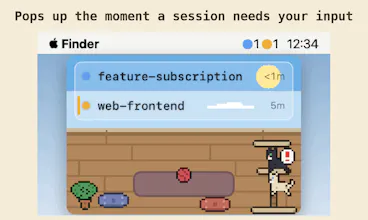
A floating macOS window for every Claude Code session. The moment one needs your input, it surfaces — and hides when all is clear. Jump to the exact terminal in one click. Native Swift, notarized, 7-day free trial.


Free Options
Launch Team / Built With


SpeedyIndex - Backlink indexing serviceGet backlinks indexed in Google, pay only for indexed URLs
Promoted
Love this idea, especially the jump-to-terminal one click since that always trips me up. One thing that would seal the deal for me is per project status icons in the floating window itself, like a little red dot or spinner right next to a project name so I can tell at a glance which session needs me without scanning titles. Would also be great if those icons respected Do Not Disturb or hid when a session is just running a long thinking step versus truly waiting on me.
@dndcltj
On the "which session needs me" part — the state lamps are already there: every row has a colored light next to the project name, and the waiting one is a pulsing amber glow with a stripe down the row's edge, so it catches your eye before you've read anything. Blue with a slow breathing animation means "working, leave it alone." And that thinking-vs-waiting distinction is structural: state comes from Claude Code's own hook events, so a long thinking step or tool call stays blue — amber only fires on explicit signals like a permission prompt or a question to you. No false alarms mid-stream.
But if what you're after is telling which project is which without reading names — like a distinct icon or color per project — that doesn't exist yet, and it's a genuinely good idea. Right now identity is the project folder name plus stable row order (rows never reorder, so muscle memory does a lot). A per-project visual mark would make that instant. Adding it to the list — and tell me which you actually meant, I'm curious now 😄
DND is a good call too: there are no Notification Center banners at all and the meow is mutable, but auto-quieting during a macOS Focus session would be the polished version. Noted!
hooks in ~/.claude/settings.json is the robust call — the seam is that it's one shared file. the other claude code watchers on this page register there too, and an uninstall leaves a stale path still firing on every event.
@qifengzheng
You've found the real seam, and I won't pretend otherwise. What AgentManager does about the shared-file half: registration is a merge, not a write — it checks whether its command already exists per event, appends alongside other tools' hooks without touching them, and the edit is a text splice that only modifies the top-level hooks key, so your formatting, comments, and symlinks survive. A .bak is written first, and if the JSON doesn't parse, it refuses to write at all rather than "fix" a file other tools depend on.
One deliberate choice against dangling: the hook script and binary are installed under ~/.claude/agent-manager/, not inside the app bundle — so moving or deleting the .app doesn't leave settings.json pointing into a Trash'd bundle, and the path is written as $HOME/... so it survives machine migrations.
But the uninstall half of your point stands: today there's no one-click unregister, so fully removing AgentManager means cleaning its entries out of settings.json yourself. That's exactly the stale-path scenario you're describing and it deserves a proper "remove hooks" button that does the surgical reverse of registration. It's going on the list — this is the most technically useful comment on the page, thank you.
That's clever. Any plan to support Linux or Windows once Claude Code agents run there?
@dhiraj_patel5
Thanks! Honest answer: no near-term plans. AgentManager is native Swift (SwiftUI + AppKit) on purpose, and the parts that make it feel good are exactly the parts that don't port — the always-on-top panel, FSEvents watching, and the terminal-jump layer built on macOS Automation/Accessibility APIs. A Linux or Windows version wouldn't be a port, it'd be a second app written from scratch.
The one honest caveat: the concept is portable. Detection is just Claude Code hooks writing local JSON, nothing Mac-specific about that half. But as a solo dev I'd rather make one platform genuinely excellent than three platforms mediocre — so for now, Mac gets all of it. If demand elsewhere gets loud enough, that math can change 😄
Claude Code sessions that need input mid-task is real pain, especially when you're juggling multiple things. Does it support notifications on iOS or just Mac desktop alerts?
@abdurrahman_fakhrul
Mac only, and honestly it's likely to stay that way for a while. The app is built around a strict "nothing leaves your Mac" rule — no server, no network, session state is just local files. Pushing notifications to an iPhone would mean routing your session activity through some backend, and that's a privacy tradeoff I don't want to make casually.
It's also a slightly different problem: AgentManager is built for the at-your-desk case — you're juggling sessions and other work on the same machine, and it surfaces the one that needs you. If you're away from the Mac entirely, a blocked session usually isn't something you can act on anyway (the terminal's back at your desk!). That said, if "know before I walk back" is a real need for you, I'd love to hear the scenario — it'd have to be designed carefully, but I'm listening.
Really I'm here for the cat sounds. Though I'd want per-session pitch, so I know which one is meowing.
@aidan_codefox
Finally, someone here for the right reasons 😄
And honestly… that's not even a joke to me. The meow is procedurally synthesized (no audio files), so giving each session its own pitch is genuinely doable — your refactor session as the deep old tomcat, the test runner as the anxious kitten. Adding it to the list, and I can't believe this is now a roadmap item. Thank you.
The native Swift choice really shows here — having a floating window that just appears and disappears instead of fighting with another Electron app is such a relief.
@ege_karama27779
Thank you — that's exactly why it had to be native. An app whose job is to appear and vanish dozens of times a day, while living permanently next to your real work, has no business shipping a browser runtime with it. Swift + AppKit keeps the panel instant and the footprint tiny, so it earns its spot as a resident instead of competing with your actual tools for resources.
(Also, pixel-art cats deserve to be rendered natively. It's a matter of principle 🐈)
Mostly Claude Code as the daily driver, with Codex CLI as the second seat and Aider for quick one-off edits. Codex is the one I d want next since it has a hooks/notify config, so a small state-writer there would slot straight into your FSEvents watcher without you inventing anything new. Aider s the weak link: no real lifecycle events, so it d be exactly the guess-from-output case you re right to refuse.
@noctis06
This is genuinely useful — you've basically written the integration sketch for me. Codex CLI's notify config is exactly the kind of seam I'd want: a small state-writer emitting the same JSON into the watched directory, and the app wouldn't even know the difference. The homework on my side is mapping its events onto the four-state model without cheating — the value here isn't "a session exists," it's the reliable distinction between blocked on you, working, and done, plus resolving the jump target the same way. If Codex's events carry enough signal for that, it slots in; if they don't, I'd rather wait than ship a lamp that lies.
And agreed on Aider — no lifecycle events means it stays out on principle, not out of laziness. Thanks for taking the time on this thread; Codex just moved to the top of the "next agent" shortlist.