
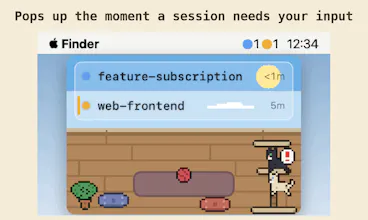
A floating macOS window for every Claude Code session. The moment one needs your input, it surfaces — and hides when all is clear. Jump to the exact terminal in one click. Native Swift, notarized, 7-day free trial.


Free Options
Launch Team / Built With


SpeedyIndex - Backlink indexing serviceGet backlinks indexed in Google, pay only for indexed URLs
Promoted
Does it track multiple Claude Code sessions at once, or is it one window per session? Wondering if this gets noisy if you're juggling several agents.
@talhakhalidmtk
One window, all sessions — each gets a row with its own state light, and the list grows as sessions come and go. No per-session windows to manage.
Noise was actually the main design constraint, because the whole point is that you're juggling several agents and the tool shouldn't add to it. So: the window hides itself whenever nothing needs you and only surfaces when a session is waiting or finished. There are no Notification Center banners at all. And the sound alert is a single short meow with a global debounce — if three sessions hit "waiting" at once, you hear one meow, not three. The more agents you run, the more that restraint matters.
this is exactly the problem with running a few Claude Code sessions in parallel - you either tab through terminals constantly to check status or you get pulled back way too late because you forgot which one was still going. a floating window that only shows up when something actually needs you is the right shape for this, way better than a generic desktop notification that gets lost in the pile. does it distinguish between "needs input" and "just finished, fyi" or is it one signal for both right now?
@omri_ben_shoham1
You've described my pre-AgentManager life exactly 😄 And yes — they're fully distinct states, styled by urgency. "Needs input" is amber: a pulsing glow, a stripe on the row's edge, and the one short meow. "Just finished, fyi" is green and completely silent — the row turns calm, the window surfaces so you notice, but nothing chirps at you. Blue means "still working, don't touch."
One subtle case I made sure of: when a session finishes and then just sits there, Claude Code emits an idle notification — that stays green. A finished session never escalates itself into fake "needs input" just because time passed. The amber signal only ever means a real blocker: a permission prompt, a plan approval, or a question waiting on you.
Been running long Claude Code sessions for my data pipeline work and the "waiting for input" problem is real — I even hacked together my own task-loop script to work around it. Curious how you handle sessions that need permission prompts mid-run? Congrats on the launch!
@piyanat_saphiman
Thank you! And a hand-rolled task-loop script is the most relatable origin story — that's basically how this app started too 😄
Mid-run permission prompts are actually the flagship case. When Claude Code shows one, it fires a hook event at that exact moment, and the session flips to "waiting" instantly — amber pulse, the floating window surfaces, one short meow. You click the row, land in the exact terminal pane, hit yes, and the next hook event flips it back to "working." Because it's all event-driven, it doesn't matter whether the prompt appears 5 seconds or 2 hours into a pipeline run — there's no polling interval to miss it and no heuristic to fool.
For long pipeline sessions specifically: the finish is treated as an event too, so when the run actually completes you get surfaced for that as well — no more discovering a done pipeline 40 minutes later. Would love to hear how it compares to your script setup if you give the trial a spin!
I'm using Wave terminal and have cluade hooks which triger wsh to display badge on terminal tab or play beep sound when user input is required or when claude completed work. Is this similar to it?
@zoran_jeremic1
Same foundation, yes — you've essentially built the single-terminal version of this with your own hands, which honestly validates the whole approach 😄 AgentManager also rides Claude Code's hooks; the difference is what happens after the event fires.
Where it goes beyond a per-tab badge: it aggregates every session across every terminal and editor into one floating window — so it still reaches you when Wave is hidden behind your browser, or when you're running sessions in three different apps at once. On top of that there's a full state model rather than two signals: "blocked on you" vs "still working" vs "done," including things like not flipping to done while background subagents are still running, and not letting an idle session masquerade as needs-input. Plus zero upkeep — hook registration and upgrades are automatic.
Straight answer on Wave specifically: detection works there fine (it's terminal-agnostic), but click-to-jump currently brings the app forward rather than landing on the exact tab — Wave doesn't have the scripting hooks I use for pane-level jumps in iTerm2 yet. If your wsh setup already covers your needs, keep it! But if you ever run sessions across more than one app, that's where this earns its keep.
@umechanhika Oh, I see. I didn't see app screenshots earlier, so I was assuming it's also displays in the terminal tab. Yeah, that problem with session being interrupted while waiting for user input is pretty annoying and this is pretty convenient solution.
@zoran_jeremic1
No worries — and the two setups don't even conflict: detection is hook-based, so it works in Wave as-is, right alongside your wsh badges. If you give it a spin with your multi-session days, I'd love to hear how it holds up. Thanks for the good conversation! 🐈
A click-to-jump shortcut is great, but it would be even better if I could pin certain sessions to stay visible even when idle, since I often switch between two long-running tasks and lose track of which window belongs to which project.
@senargf3
Good news on half of this: sessions never leave the list while they're alive — idle ones stay right there as grey rows, and every row is labeled with its project folder name. So "which window belongs to which project" is exactly what the list answers: glance, click, and you're in that project's terminal. The window itself is also one ⌥Space away at any moment, even when it's auto-hidden.
The other half — keeping it visible through idle instead of auto-hiding — is a fair ask. Auto-hide is the default because "quiet when nothing needs you" is the app's whole personality, but a pin option for people juggling two long-running tasks wouldn't fight that. Adding it to the list — thanks for the concrete use case, that's the kind that actually shapes the roadmap!
@senargf3
Just shipped v1.14.1 — you can now pin the window to opt out of auto-hide. Your request made it the top-voted item, so it went first. Thanks for pushing on this!
Honestly this looks super useful since I constantly lose track of which Claude session is actually waiting on me. One thing though, would be great if it could play a subtle sound or send a native macOS notification when a session needs input, kind of like how Messages does it. Sometimes the floating window might be hidden behind another app and I would totally miss it otherwise.
@araczeliha97691
Good news — the sound already exists, and it's the app's signature move: a subtle cat meow (~0.35s) the moment a session starts waiting 🐱 It's mutable if meows aren't your office vibe, and if several sessions hit "waiting" at once it's debounced so you get one meow, not a chorus.
On the buried-window worry: the floating window is always-on-top, and it re-surfaces in front the moment any session needs you — so it can't actually get lost behind other apps. Between the meow, the auto-surface, and the live counts in the menu bar, I deliberately skipped Notification Center: banners pile up, get swiped away, and end up as one more inbox to ignore. The window appearing is the notification, and it disappears once you've handled things.
Give the trial a spin and tell me if a waiting session ever actually slips past you — if it does, that's a bug in my book and I want to hear about it.
this looks super useful for keeping tabs on multiple sessions, honestly the auto-surfacing is a nice touch. one thing though, it would be great if you could pin certain sessions to stay visible even when nothing needs input, so you can monitor like a long-running build or deploy without it disappearing on you
@sebahat45760404
Thanks! Good news for the build/deploy case specifically: you may not need to watch it at all. The moment a long-running session finishes, it flips to "done" and the window surfaces on its own — completion is treated as an event worth your attention, same as waiting for input. And while it's running, the menu bar keeps a live per-state count, so a glance tells you it's still going without any window open. ⌥Space summons the full list any time you want a closer look.
That said, "keep it visible, I just want to watch" is a fair and different ask — and you're actually the second person requesting a pin option today, which officially moves it up the list 😄 Auto-hide is the default because staying quiet when nothing needs you is the app's whole personality, but an opt-in pin wouldn't fight that. Thanks for the concrete use case!