Launching today

Agentic HTML Visual Editor
Review AI-written docs visually in VS Code
1 follower
Review AI-written docs visually in VS Code
1 follower
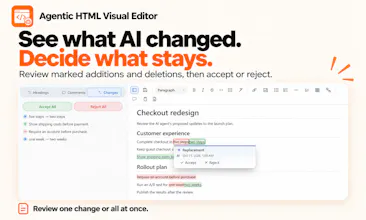
Stop copying AI-written passages into chat to request edits. Review HTML documents visually in VS Code, leave comments on selected text, and keep replies in the same file. With the Agent Skill, AI agents can read your feedback, revise documents, and mark changes for review.


Free
Launch Team / Built With


World model AI : Sharm SEKAISimulate your idea on a living world.
Promoted
Hey Product Hunt!
I'm the developer of Agentic HTML Visual Editor, a VS Code extension I built to make reviewing AI-generated documents easier.
Why I built it
As I started delegating more work to AI agents, I found myself spending more time reviewing their research reports and design notes than writing them.
The frustrating part wasn't reading the documents. It was requesting changes.
Every time I wanted something changed, I had to find the relevant passage, copy it into chat, explain what I wanted, and rely on the agent to locate that passage in the original document.
I was already using HTML instead of Markdown for richer document layouts, but that only solved the readability problem. Feedback and decisions were still scattered across chat history.
What I built
I wanted to leave feedback directly where I was reading, so I built a visual HTML editor for VS Code.
Here's how it works:
Ask an AI agent to generate a research report or design note as HTML.
Open it in the visual editor and leave comments on specific passages, or edit the text directly.
Save the file and ask the agent to review it. With the companion Agent Skill, it can read your comments, reply, and revise the document.
Review the agent's replies and proposed changes in the same editor, accepting or rejecting marked changes.
Comments and replies are stored directly in the HTML file, so the conversation stays attached to the document rather than getting lost in chat.
My goal was to make the next instruction to the agent as simple as:
"I've made changes; please review them."
I'd love your feedback
How do you currently review documents generated by AI agents?
Do you find yourself copying passages into chat to request changes, or have you found a better workflow?