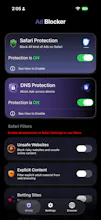
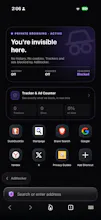
Most iOS ad blockers only work in Safari. Open a link inside Instagram or Reddit and the ads are back. Ad Blocker works at three layers: Safari content blocking, DNS-level filtering that stops ads and trackers across every app on your device, and a built-in private browser with strict tracker protection. It also blocks known malicious domains and shows a live counter of what's been blocked, so you can see it working. No account, no login. Two toggles, under a minute.
Hi Product Hunt 👋
I'm an iOS engineer, and this started as a personal annoyance. I had
a Safari content blocker installed and assumed I was covered — until
I actually looked at what was still getting through. Every link I
opened inside Instagram, Reddit, or Twitter loads in that app's own
in-app browser, where Safari's content blocker doesn't apply at all.
That's where most of my browsing actually happens.
So I built something that works at three layers instead of one:
Safari content blocking, DNS-level filtering that covers every app on
the device, and a private browser for when you want the strict version.
The hardest part was the DNS layer. Getting it reliable without
draining battery or breaking apps that legitimately need certain
domains took far longer than the rest of the app combined. I'm still
tuning the filter lists.
I also spent real time on the dashboard because most privacy tools
either hide everything or dump raw logs at you. I wanted you to be
able to glance at it and know it's working.
No account, no login, no data collected.
Two things I'd genuinely like input on:
If you already use an ad blocker on iOS — did you know about the
in-app browser gap? Most people I've asked didn't.
And what would make you keep a blocker installed a year from now
rather than uninstalling after a week?
Happy to go into the technical details on the DNS implementation or
the content blocker rules if anyone's interested.