
A11y Navigation Auditor
All your structural a11y checks, in one Chrome side panel
6 followers
All your structural a11y checks, in one Chrome side panel
6 followers
Visualize your page's structure, accessible names, and live ARIA states—all in one Chrome side panel. See the information assistive tech relies on at a glance, with issues flagged automatically (error / warning / info). No overlay clutter, no DevTools digging. On-device AI guidance powered by Gemini Nano—100% local, zero data leaving your browser.




Hey Product Hunt 👋
As the creator of A11y Navigation Auditor and an IAAP WAS (Certified Web Accessibility Specialist), I've spent years auditing websites. Over time, I've felt that existing tools for auditing page structure have clear limitations.
Existing approaches each have trade-offs: single-category extensions force you to switch tools just to check headings or landmarks; overlay-based tools clutter the page and block your view; and digging through deeply nested DevTools panels is just overwhelming.
That's why I built this tool. It unifies and visualizes your page's underlying structure right inside a clean Chrome side panel. You can capture the entire "backbone" of your site at a glance and perform professional-grade structural audits without the noise.
✨ Key Features:
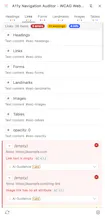
- 6 Core Categories: A unified view for Headings, Links, Form Controls, Landmarks, Images, and Tables—inspired by VoiceOver's Rotor, surfacing the information assistive tech relies on.
- Accessible Names & Live ARIA Monitoring: See each element's computed accessible name (per the AccName spec) and track dynamic ARIA state changes in real time.
- On-Device AI Guidance: Powered by Chrome's built-in Gemini Nano, the tool provides context-aware guidance instantly and locally—no API key, no token costs, zero data leaving your browser.
🔍 What You'll See:
- Headings: full hierarchy (h1–h6, including role="heading"), each with its accessible name and where the name comes from.
- Links: accessible name and destination URL for every link, with classification icons (navigation / new window / in-page anchor) and aria-current state.
- Form Controls: accessible name and its source, element type/role, autocomplete values, and real-time ARIA state badges (aria-expanded, aria-pressed, aria-invalid, and more).
- Landmarks: the full landmark structure of the page—each landmark's type, source HTML element, and accessible name.
- Images: thumbnail preview, accessible name, and classification (informative / decorative / text image / linked image).
- Tables: accessible name, dimensions, header cell () and presence, and accessible description.
⚡ Built for Real Audit Work:
- Issues flagged as errors, warnings, or info—so you can prioritize at a glance.
- Each finding references a WCAG Success Criterion for traceable, defensible audits.
- Click any item in the side panel to scroll to and highlight the matching element on the page.
- Live ARIA tracking via MutationObserver—no manual rescans, just differential updates as you interact.
- Third-party widgets (cookie banners, consent UIs) excluded automatically, so you can focus on your own content.
I designed this tool from an auditor's practical perspective—to make accessibility a baseline of quality, not a hurdle. I'd love to hear from you: what's the most frustrating part of your structural auditing workflow today?
Thanks so much for your support! ❤️