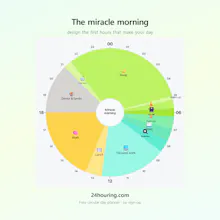
24Houring turns your day into a 24-hour circle you can draw on. Drag to resize blocks, see sleep, work and rest as one shape, and keep a daily diary. Free in the browser â no sign-up, works offline, and syncs across devices when you want it to.
Hey Product Hunt ð
If you grew up in Korea or Japan, you probably remember drawing a
ėíęģíí(saenghwal-gyehoekpyo) â a "daily life plan chart" â at the start of every
school vacation. One circle on a sheet of paper, a ruler to divide the day,
and colored pencils for waking up, studying, playing, sleeping. Most of them
survived about three days before ending up in a drawer. But the shape stuck.
Every planner I used as an adult was a list. A list shows you "eight things
to do today." It doesn't show you that you only have three usable hours left
after work, or that "just 30 more minutes" is eating into your sleep. A day
isn't a list â it's a circle. So I rebuilt that childhood chart for the web.
ââ What you can do
âĒ Drag the boundary between two blocks to resize them. There's no form for
typing start and end times.
âĒ Sleep is a block like any other, so you end up planning all 24 hours,
not only the working ones.
âĒ Save a schedule per weekday, and each morning that day's plan loads itself.
âĒ Leave a one-line diary entry at night. It works as a record of your days,
not just a plan for them.
Planning and recording â that's all this version does. Before adding more,
I wanted to find out whether those two are worth opening every day.
ââ How I hope it gets used
I built it to sit in your desktop browser as the first thing you open. You
start the browser in the morning and today's circle is there; it stays in one
tab all day; at night you write a line and close it. I think of the phone less
as a place to plan and more as a window to check the day you drew on the
desktop. Drawing on a big screen and glancing at it on a small one felt far
more natural than dragging a circle around on a phone.
ââ Pricing
The planner itself is free and will stay free. No sign-up, no account, it
works offline, and your data lives in your browser rather than on a server.
Pro ($0.99/month) only adds cloud sync across devices and alarms that reach
you with the tab closed.
There's no AI in it. That's deliberate. I wanted a quiet tool, not another
chat box.
One question for you: when you first saw your day drawn as a circle, what
surprised you? For me it was seeing how little room I had left for exercise.
I put a workout block into the circle, and now when the alarm goes off, I go
out and move.
Thanks for taking a look â I'll be here all day answering comments.