
Wave
Turn your voice into text — local or cloud, your choice
556 followers
Turn your voice into text — local or cloud, your choice
556 followers
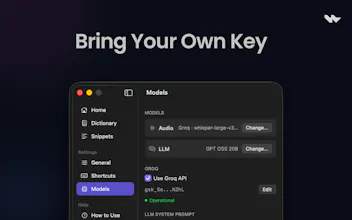
Wave lets you invoke an AI model anywhere on macOS using just your voice. Hold a hotkey, speak, and release—your speech is transcribed, processed, and the result appears exactly where you need it. If you're typing, it replaces or inserts text. If you're reading, it shows a floating answer. Works across all apps with selected text as context.



@monawwar Interesting concept is there any way of contribution?
@suryansh1344 Thanks <3, Wave is 100% open-source project. You can contribute to the project on Github,
@monawwar Congrats on the launch! One thing worth thinking about as you scale — if you're handling any sensitive user data through your API, payload encryption at the application layer is worth looking at. TLS doesn't cover what happens after termination. Happy to chat if useful.
the floating answer mode for when you're reading is the use case i keep thinking about. right now my workflow for looking something up while reading is cmd-tab to a browser or open a new Claude window which breaks the reading context completely. a floating answer that appears in place without switching apps is a different kind of interaction. curious how the floating UI actually works, does it appear near the cursor or in a fixed position, and what dismisses it
@ansari_adin agreed <3, and as for your question, the pill appears at the bottom center of the screen
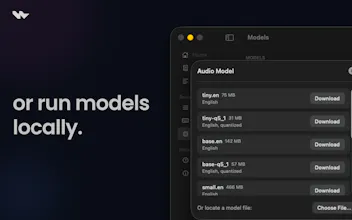
The local Whisper option is what got my attention, most of these tools quietly push you to the cloud and hide that choice somewhere deep in the settings the floating answer while reading is the use case I keep coming back to, opening a new window just to look something up kills the focus every time, curious how it holds up on longer dictation though, does accuracy stay solid on a 2 minute ramble or is it more tuned for short commands?
@imoluuu since the app itself doesn't enforce or restrict any AI models, the accuracy depends al on the model you picked from the settings
Local-OR-cloud is the right wedge - most speech-to-text tools quietly force the cloud and then bury that decision three menus deep. I build voice agents and the thing I keep relearning is that transcription is only half the job: where most tools lose users is what happens after the words land on screen. Editing friction, formatting, getting it into the next app. If Wave nails that handoff as cleanly as the privacy choice, it's a different product than the rest of the category.
@david_marko Thank you David for the feedback.
Open and free with local Whisper is the part that'd get me to actually install it. Interested in this - running fully local, which Whisper size are you defaulting to and how do you keep the release-to-text latency low enough that it still feels like it appears where you need it? Overall, well done!
@sa206 thanks <3
hold-hotkey-speak-release is exactly how voice input should work. no app switching, no extra windows. the local whisper option is a nice touch too for anyone paranoid about sending audio to the cloud