What impressed me most while testing Traccia was that it didn’t just show LLM costs—it made those figures verifiable.
I connected a LangChain agent to an Anthropic model and ran more than 40 real API calls under different configurations. Traccia recorded the provider-reported token usage, the pricing data applied, and the version and age of the pricing snapshot. I calculated the costs independently and compared the totals, and they matched exactly without any double counting.
I also liked its OpenTelemetry-based design. It connected seamlessly to my existing Jaeger and Grafana stack without introducing a proprietary telemetry format. With observability tools, being able to migrate away matters almost as much as ease of adoption, and Traccia appears to have considered that.
There are still a few areas that could use more work in the current version. Automatic instrumentation did not capture direct Anthropic SDK calls in my environment, LangChain tool calls did not produce their own spans, and PII redaction did not cover every exported attribute. Before adopting it in production, I would verify the span tree using the exact framework and SDK versions in use, and inspect the exported data for sensitive information.
Even with those limitations, Traccia is worth trying for teams that want transparent and auditable LLM cost tracking. Teams already using an OpenTelemetry-based observability stack should find it especially easy to evaluate.
Traccia’s greatest strength is that it doesn’t just tell you how much an LLM call cost—it provides enough evidence to answer, “Why did it cost this much?”


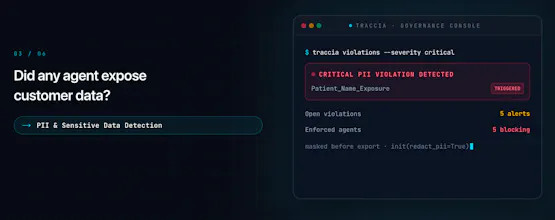


We’ve been building Traccia because we kept seeing the same gap with AI agents: once an agent can call tools, make decisions and take actions, a traditional trace can tell you what happened — but not whether that action was acceptable.
With traditional software, an execution usually follows a path defined by the developer. Agents are different. They can reason, choose tools, change their path and take actions we didn’t explicitly define.
That creates a new infrastructure problem for teams deploying agents in production:
What did the agent do? Why did it do it? Was it allowed to? Which policy and permissions applied? And can we prove what happened afterwards?
Traccia is our AI Agent Control Plane — a vendor-neutral layer to observe what agents do, evaluate how they behave, govern what they’re allowed to do, and audit what happened.
We’ve open-sourced the Traccia SDK and built it developer-first, with OpenTelemetry at the foundation. It works across models and agent frameworks, so teams can add observability and governance without being locked into a single AI vendor. We’re still early, and we’re building this alongside developers and teams actually deploying agents.
I’d especially love feedback from people running agents in production:
What are you using today to debug agent behaviour?
How are you evaluating agents?
And more importantly — how do you control what an agent is allowed to do?
We’re also making it easier to try Traccia during the launch.
3 months free with coupon code: TRACCIAPH
Did there occur any specific cases with AI agents that you could label as anomaly within their process?
@busmark_w_nika Thank you for a great question. Yes — we’ve seen this particularly with MCP-based workflows. An agent can get into a pattern of repeatedly calling tools, sometimes far beyond what was expected, and the workflow can continue consuming time and tokens without actually making progress.
That’s why we have policies around things like maximum tool calls, specific model calls, and other execution constraints. The idea is to detect and enforce those limits at the agent execution layer rather than only discovering the problem after the run is over.
With agents, an “anomaly” isn’t necessarily a failed run — sometimes it’s a run that is technically working but doing far more than it should.
Vendor neutrality is important. How easy to setup and commission?
@lalit_bhatt3 super easy, Lalit. The SDK can be used with just a single line of code + the API key from the platform.
The product is enterprise-ready, so you can login with your company email too and let your teammates join your org.
Hey Product Hunt 👋 We’re live.
I’m one of the makers of Traccia. If you’ve ever watched an agent take a tool call you didn’t expect and then scrolled a 2,000-span trace trying to answer “was that even allowed?” - that’s the pain that started this.
What ships today
Open-source SDK (Python + Node), OpenTelemetry-native
Full-fidelity traces across models/agent frameworks
Eval path: prompts → datasets → scorers → experiments before you promote
Runtime governance: policies + evidence so “observe” isn’t the end of the story
Who this is for
Teams putting agents in production - not demos. If your stack already tells you what happened, but not whether it should have happened, you’re our ICP.
One ask
If you run agents in prod, comment with your current stack for:
debugging a bad tool call
deciding promote vs rollback
blocking an action at runtime
Even “we use X and it’s fine/it sucks because Y” helps more than a silent upvote.
Trying Traccia today? Platform is open - use coupon TRACCIAPH for 3 months free. I’ll be in the comments all day and will answer everything personally.
https://traccia.ai
- Aditya (and the Traccia team)
Congratulations on the launch! It sounds like a really useful project based on the description. I’ll show it to our team - we’re currently using a similar solution...
@natalia_iankovych that's awesome. Do give Traccia a shot. Feel free to ping me in case you want to know more about anything.
Congrats on the launch. Open sourcing the SDK is a lot to give away for a control plane, good to see.
@lucasjpols Thank you ! We’re on a mission to help enterprises deploy AI agents to production with confidence. We’re open-sourcing the SDK because we want the instrumentation and execution data to be as accessible as possible, while the control plane sits above it to help teams enforce policies and govern those agents in production.
The Tsunami of AI agents will overhelm the industry. Every organization and team wants to build AI agents. Yet, once the initial excitement fades and these agents are operating at scale, difficult questions will emerge
Was my agent actually allowed to do that?
Why did it make that decision?
Could I have prevented that action?
How do I stop a rogue execution before it causes harm?
Traccia as an AI agent control plane ensures you have the right visibility and control over what you agents can do, what they can access, terminate calls on policy violation and many more.
Trying Traccia today? Platform is open - use coupon TRACCIAPH for 3 months free