A simple, free web app that makes timezone coordination effortless. Compare different cities timezones, drag to explore time changes, and instantly find overlap — no logins, no chaos. Built for remote teams that need clarity, not confusion.
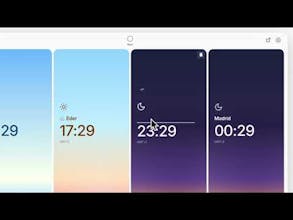
I’m excited to share Timepeek, a small web app I built to help remote teams coordinate better across timezones. A simple and clean solution for a recurrent need. With Timepeek, you can:
Add cities (or rename them as team roles) to track everyone's local time
Drag the clock to simulate time changes — see everyone’s hours shift in real time
Type a specific time in any location and instantly preview how it affects the rest
Share a unique link — no logins, no setup, no distractions
Use it completely free
Quickly spot overlaps and ideal times thanks to subtle color-coding for different periods of the day
Responsive and it adapts to browser dark/light theme
I built this tool out of necessity while working with global teams. It’s lightweight, fast, and focused on doing one thing really well: making timezone coordination easier. How do I use it? I built different setups for the different teams I work with and bookmark them in Slack and my browser. Whenever I need to schedule something, I access to each setup and play with the slider, or input specific times to be sure I schedule meetings within an acceptable range. I also put them in a secondary monitor to be sure I have context of their timezones when interact with them. The nice gradients help to make it work as a nice background for my workspace.
I’m excited to share Timepeek, a small web app I built to help remote teams coordinate better across timezones. A simple and clean solution for a recurrent need. With Timepeek, you can:
Add cities (or rename them as team roles) to track everyone's local time
Drag the clock to simulate time changes — see everyone’s hours shift in real time
Type a specific time in any location and instantly preview how it affects the rest
Share a unique link — no logins, no setup, no distractions
Use it completely free
Quickly spot overlaps and ideal times thanks to subtle color-coding for different periods of the day
Responsive and it adapts to browser dark/light theme
I built this tool out of necessity while working with global teams. It’s lightweight, fast, and focused on doing one thing really well: making timezone coordination easier. How do I use it? I built different setups for the different teams I work with and bookmark them in Slack and my browser. Whenever I need to schedule something, I access to each setup and play with the slider, or input specific times to be sure I schedule meetings within an acceptable range. I also put them in a secondary monitor to be sure I have context of their timezones when interact with them. The nice gradients help to make it work as a nice background for my workspace.
Datalink
👋 Hey there!
I’m excited to share Timepeek, a small web app I built to help remote teams coordinate better across timezones. A simple and clean solution for a recurrent need. With Timepeek, you can:
Add cities (or rename them as team roles) to track everyone's local time
Drag the clock to simulate time changes — see everyone’s hours shift in real time
Type a specific time in any location and instantly preview how it affects the rest
Share a unique link — no logins, no setup, no distractions
Use it completely free
Quickly spot overlaps and ideal times thanks to subtle color-coding for different periods of the day
Responsive and it adapts to browser dark/light theme
https://timepeek.app/
I built this tool out of necessity while working with global teams. It’s lightweight, fast, and focused on doing one thing really well: making timezone coordination easier. How do I use it? I built different setups for the different teams I work with and bookmark them in Slack and my browser. Whenever I need to schedule something, I access to each setup and play with the slider, or input specific times to be sure I schedule meetings within an acceptable range. I also put them in a secondary monitor to be sure I have context of their timezones when interact with them. The nice gradients help to make it work as a nice background for my workspace.
Would love to hear your thoughts and feedback!